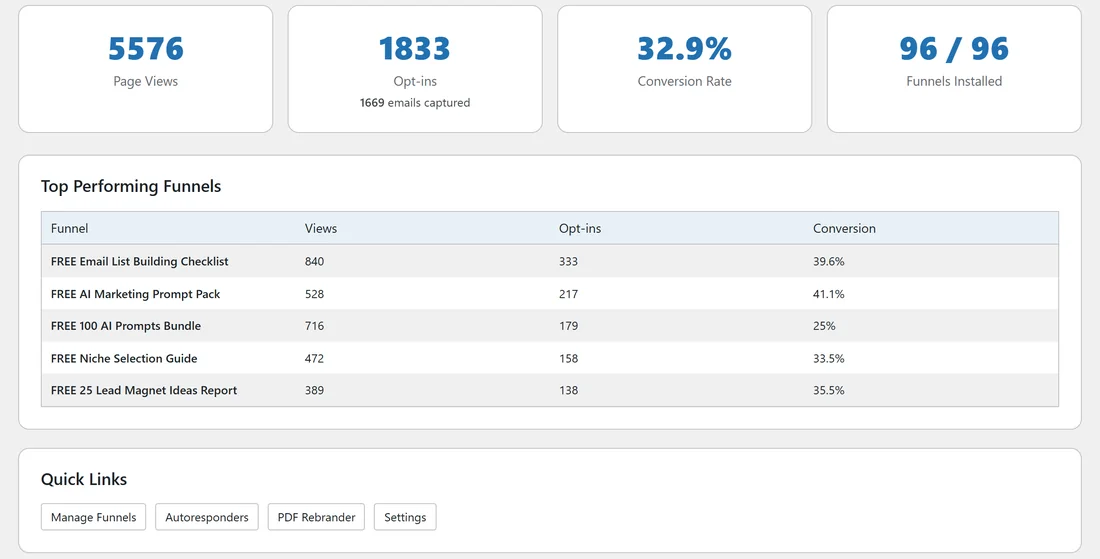
The Dashboard is the first screen of the plugin. It tells you in a few seconds how your funnels are doing: how many people saw your opt-in pages, how many opted in, and which funnels work best.
Where to find it:
Click Free List Building in the WordPress menu, or click the Dashboard tab on any plugin screen.
The four number cards:

- Page Views: every visit to a funnel's opt-in page (the squeeze page), all time. Bots and your own visits while logged in as an administrator are not counted.
- Opt-ins: counted each time a visitor reaches a funnel's download page. This is how opt-ins are counted for every autoresponder, including AWeber and pasted forms that send people straight to the provider. Under it you see how many emails were captured: the number of addresses this site actually received and stored. Hover the card for a short explanation.
- Conversion Rate: opt-ins divided by page views, as a percentage.
- Funnels Installed: how many funnels have their files on your site, for example 96 / 96.
Top Performing Funnels:
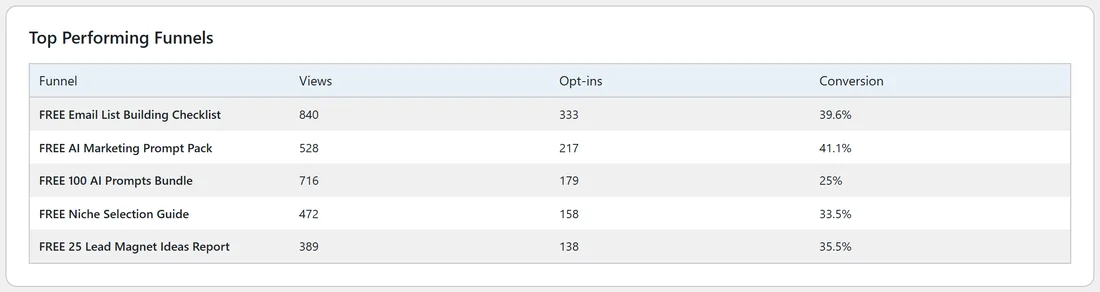
A table of your five funnels with the most opt-ins, with Views, Opt-ins and Conversion for each. Use it to see which free guides your visitors like most.
Quick Links:
Buttons for Manage Funnels, Autoresponders, PDF Rebrander and Settings.
Boxes that appear when something needs doing:

- Welcome to Free List Building Website! with a Run Setup Wizard button, until you finish the setup wizard.
- Funnel Assets Not Installed with an Open Asset Manager button, until the funnel files are on your site.
- Permalinks Need to Be Updated with a Fix Permalinks Now button, if your permalinks are on Plain.
A real example:
Six weeks after launch, Sam Rivera's Dashboard on yoursite.com shows 5576 page views, 1833 opt-ins, 1669 emails captured and a 32.9% conversion rate. The top funnel is FREE Email List Building Checklist with 840 views and 333 opt-ins (39.6%). Sam decides to promote that funnel harder this month using its Traffic Toolkit.
Tips:
- The emails captured line is the count of real addresses in your Lists tab. Use it when you compare with your autoresponder.
- Click any funnel's Edit button on the Funnels tab to see the same numbers for just that funnel (see Per-Funnel Stats Cards).
- A conversion rate between 25% and 45% is a healthy range for a free guide with a short opt-in form.
- See Built-in Funnel Analytics for how every number is counted.