The plugin keeps its help links in two places, so you never have to search for them. This article lists them and what each one is for.
Help & your account:
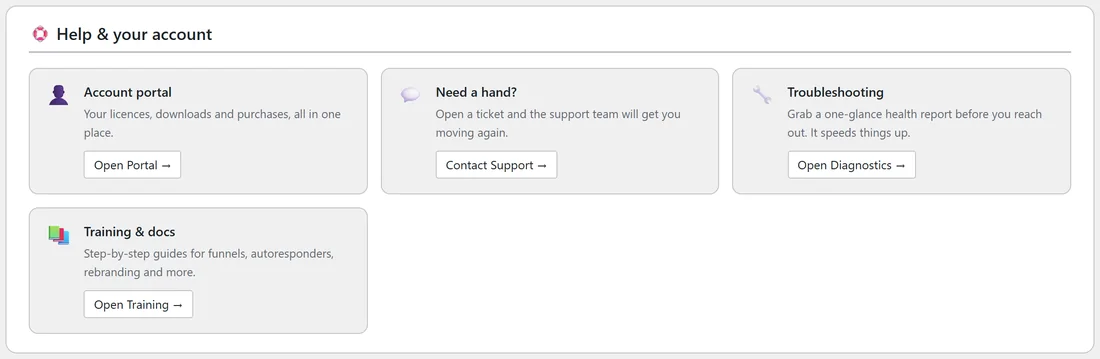
Open Free List Building, click the Settings tab and scroll down to Help & your account. It has four cards:
- Account portal: your licences, downloads and purchases in one place. Click Open Portal.
- Need a hand?: open a ticket with the support team. Click Contact Support, which opens the support desk at kevinfahey.org/contact-support/.
- Troubleshooting: click Open Diagnostics for a one screen health report of your site. It is worth a look before you contact support.
- Training & docs: click Open Training for the step by step guide built into the plugin.
The footer of every screen:

At the bottom of every plugin screen you will find two cards, one for ResultsWithKevin.com and one for ResultsAiX.com, where you can see the latest releases, updates and free training. Under them a small line shows the plugin version and links to the ResultsAiX platform and to Support.
Other useful places:
- Training tab: the full training guide, opened from the top bar. See The Training, Resources and Hub Tabs.
- Resources tab: other plugins and tools that work alongside this one, with an Installed label on the ones already on your site.
- Diagnostics tab: your full system report and the Copy Full Report To Clipboard button. See The Diagnostics Tab.
- Settings, Debug Log: the plugin's own log of opt-ins and autoresponder replies. See Built-in Debug Logger.
A real example:
Sam at Your Site wanted to move the plugin to a new domain. Open Portal showed the licence key and its sites, the licence panel at the top of Settings freed the old site's slot, and Open Training explained the setup steps on the new site.
Tips:
- Bookmark the support desk link so you have it outside WordPress too.
- When you open a ticket, paste your Diagnostics report and your Debug Log. See How to Get Support.