Free List Building Website runs inside a normal WordPress site. It serves 96 done-for-you opt-in funnels from your own domain, so your hosting needs a few basics in place. Almost every modern host meets them out of the box.
The quickest way to check is the Diagnostics tab. It reads your server settings and shows a green OK or Loaded chip next to each item.
What you need:
- WordPress 5.6 or later. Any current version is fine.
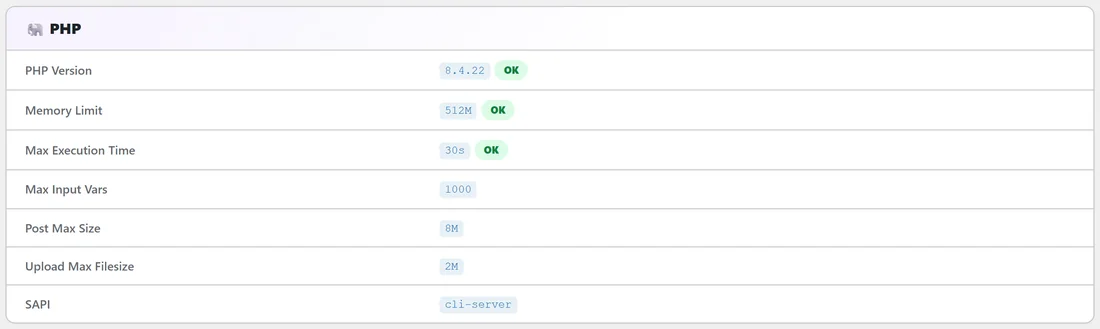
- PHP 7.4 or later. PHP 8.0 or later shows a green OK chip on Diagnostics and is what we suggest.
- A PHP memory limit of 128M or more. The PDF Rebrander uses the most memory, and Diagnostics shows "Recommend 128M+ for PDF rebranding" when the limit is lower.
- A max execution time of 30 seconds or more. Longer is better for the one-time funnel download and for big PDF batches.
- WordPress permalinks set to Post name. Funnel addresses such as yoursite.com/free/EmailListBuildingChecklist/ need pretty permalinks.
- An uploads folder WordPress can write to. Funnel files are stored in wp-content/uploads/listbuilderpro-assets/.
- An administrator login to install the plugin and change settings.
PHP extensions:
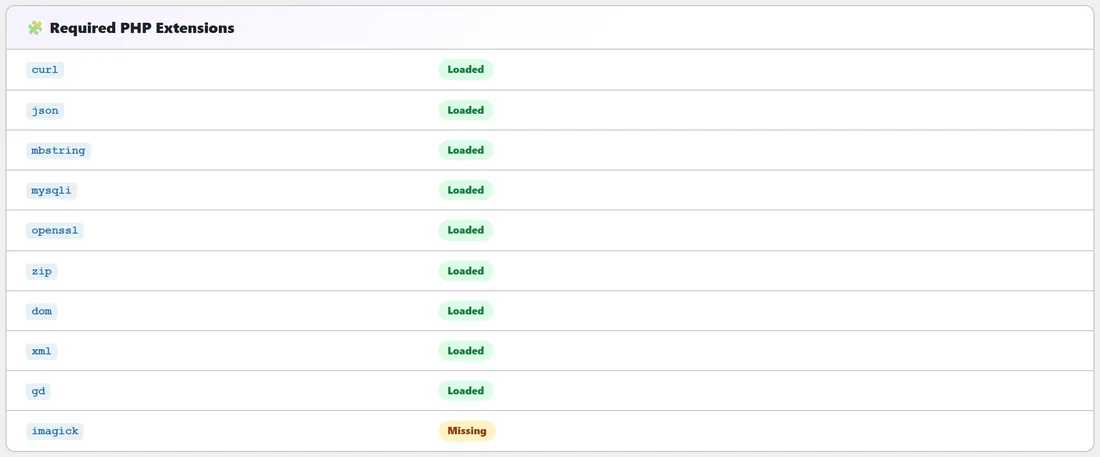
Diagnostics lists the extensions the plugin uses: curl, json, mbstring, mysqli, openssl, zip, dom, xml and gd. Imagick is listed too but is optional, the plugin works without it. If any other extension shows a yellow chip, your host can switch it on in a minute.
Permalinks are set for you:
When you activate the plugin on a site that still uses Plain permalinks, the plugin switches them to Post name for you. If your site later goes back to Plain, the Dashboard shows a red "Permalinks Need to Be Updated" box with a Fix Permalinks Now button. Click it, choose Post name and click Save Changes.
Where to check it:
- In WordPress, click Free List Building in the left menu.
- Click the Diagnostics tab.
- Look at the PHP, Required PHP Extensions and WordPress sections. Everything you need should show a green chip.
A real example:
Sam Rivera runs yoursite.com on a shared hosting plan. Before installing, Sam opens Diagnostics on a test copy of the site and sees PHP 8.2 with an OK chip, a 512M memory limit and every extension Loaded except imagick. That is all good to go, so Sam installs the plugin on the live site the same afternoon.
Tips:
- Most hosts let you raise the memory limit and PHP version yourself from the hosting control panel. Your host's support team can do it for you too.
- Keep the Diagnostics tab in mind for later. The Copy Full Report To Clipboard button at the bottom gives support everything in one paste (see The Diagnostics Tab).
- Next step: see Installing the Plugin.