WP Conversion Tracker follows every click on your tracked links and, through its Audience Vault, ties clicks, buyers and revenue to real people. The Mailer reads that data directly from the same database.
That lets you email people by what they do on your website, not only by what they do with your emails.
Where to find it:
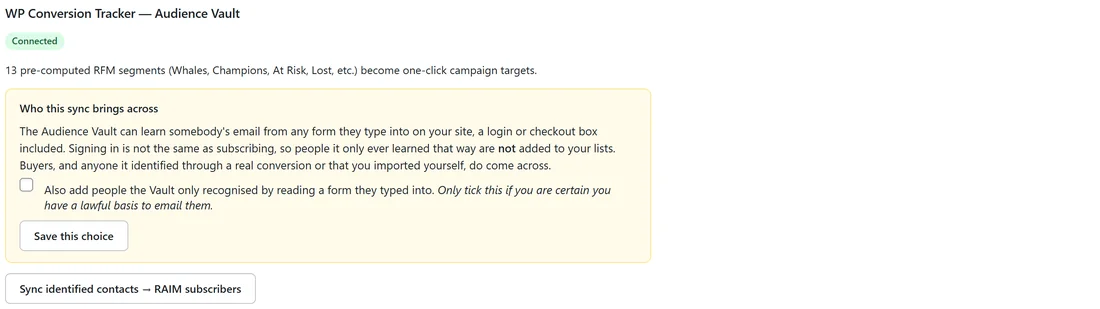
Go to Setup, then Integrations, and find the WP Conversion Tracker section. It says Connected when the tracker is active on the same site.
What it adds to the Mailer:
- Two site click filters in every audience builder, under WCT Audience Vault: Site click activity (WCT), with clicked a tracked link within last or no tracked click for more than a number of days, and Lifetime tracked clicks (WCT), with is at least, is at most or is between.
- 13 ready-made buyer segments in every segment picker, each with a live count, refreshed every night.
- The AI Segment Builder understands all of it, so you can type anyone who clicked a link in the past 120 days, or my at-risk buyers.
- A sync that brings the people the Vault has identified into your subscriber list.
The 13 segments:
- Whales: your biggest customers by total spend.
- Champions: active high-value buyers.
- Big Spenders: high spend across all purchases.
- Loyal: 5 or more purchases and still active.
- New Customers: bought recently for the first time.
- Hot Leads: clicking in the last 7 days but not buying.
- Can't Lose: spent well but gone 90 days or more.
- At Risk: frequent buyers gone 60 days or more.
- Lost: gone 365 days or more.
- Lapsed: no activity in 365 days or more.
- High Churn: three times past their normal buying pattern.
- Churning: one and a half times past their normal pattern.
- Resurrected: were gone 60 days or more and just came back.
In segment pickers they appear as Vault: followed by the name and the count, for example Vault: Hot Leads.
Syncing identified people into your list:
- Go to Setup, then Integrations.
- Read the Who this sync brings across box. Buyers, people the Vault identified through a real conversion, and people you imported yourself come across. People it only recognised from a login or checkout box are held back, because signing in is not subscribing.
- Only tick Also add people the Vault only recognised by reading a form they typed into if you are certain you have a lawful basis to email them, and click Save this choice.
- Click Sync identified contacts to RAIM subscribers (the button shows an arrow between the two).
The sync runs in chunks, so it copes with vaults of 50,000 people or more. Everyone it adds arrives under the silent import lock, so nothing triggers a welcome email or sequence by accident. See The Silent Import Lock.
The hourly sync:
The tracker also enriches the Mailer every hour. If you only want new subscribers from real sign-ups, sales and imports, tick Only create people from direct sign-ups, sales and imports on Setup, then Settings. Existing subscribers still get their details filled in. See Choosing Who Becomes A Subscriber.
A real example:
Leafwise Gardening tracks every link in its blog posts and social posts with WP Conversion Tracker. Before the Black Friday bundle sale, Anna picks the Vault: Hot Leads segment, people clicking in the last week who have not bought. She sends them a short note about the bundle. For a win-back email she uses Site click activity (WCT), no tracked click for more than 120 days.
Tips:
- The more links you track, the richer every segment becomes: emails, social posts and affiliate promotions all count.
- Combine a Vault segment with other filters, such as a list or a tag, in the audience builder.
- Not installed yet? The Vault segments and click filters simply stay hidden until it is. Read more at resultsaix.com/wp-conversion-tracker/.