When WP Conversion Tracker or Launch Manager is installed on the same site, the Mailer reads their data. That is useful, because it fills in names, countries and purchase history for people you already have.
It also means that, by default, an old buyer or a visitor the tracker recognised can be added to your audience as a new subscriber. If you would rather only add people who signed up, bought or were imported on purpose, switch on one setting.
Where to find it:
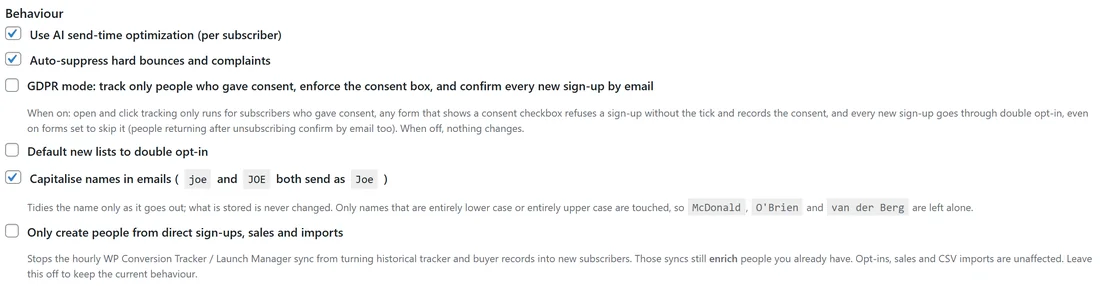
Setup, then Settings, then the Behaviour section: Only create people from direct sign-ups, sales and imports.
Switching it on:
- Open Setup, then Settings.
- In the Behaviour section, tick Only create people from direct sign-ups, sales and imports.
- Press Save Settings at the bottom of the box.
What changes:
- The hourly WP Conversion Tracker and Launch Manager sync still enriches people you already have, for example adding their purchases and country.
- The sync can no longer add anybody new.
- Automatic buyer lists only fill with people who are already in your audience, so the sync no longer makes lists it could never fill.
What does not change:
- Somebody filling in one of your forms.
- A sale.
- A CSV import.
- Adding somebody by hand.
The setting is off by default, so nothing changes unless you turn it on.
People you deleted coming back:
If you deleted people and they reappeared an hour later, the sync brought them back from the tracker's or Launch Manager's records. Switch this setting on and they stay deleted.
A real example:
Leafwise Gardening runs WP Conversion Tracker on the same site, and its Audience Vault knows thousands of visitors and past buyers, many from years ago. Anna only wants people who opted in or bought recently. She ticked Only create people from direct sign-ups, sales and imports. Her existing subscribers still get their purchase history from the sync, but no old record turns into a new subscriber.
Tips:
- To keep people who keep coming back out of your emails for good, use Delete + never email on the Subscribers screen. See The Subscribers Screen.
- For old records you want to keep but not mail, archive them instead. See Verify Leads: Clean An Old List Before You Mail It.
- See The ResultsAiX Ecosystem: More Data, Smarter Emails for what the other plugins add.