People type their names however they like. Some type joe, some type JOE, and both look careless in an email that opens with "Hi".
Capitalise names in emails tidies the name as each email goes out. The name stored on the subscriber stays exactly as they typed it; only the copy in the email is tidied.
Where to find it:
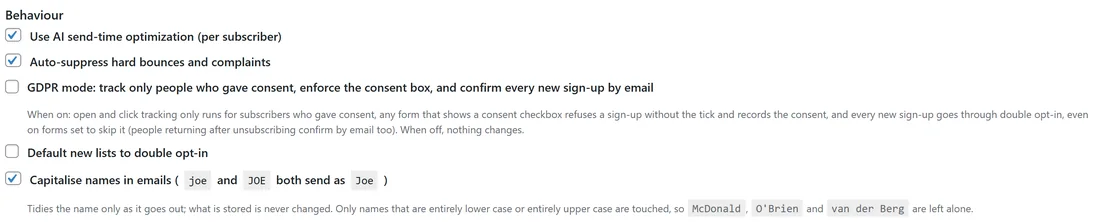
Setup, then Settings, then Behaviour. Tick Capitalise names in emails (joe and JOE both send as Joe) and press Save Settings at the bottom of that section.
Turning it on:
- Open Setup, then Settings.
- Scroll to Behaviour.
- Tick Capitalise names in emails.
- Press Save Settings.
From then on every email uses the tidied names: broadcasts, automation emails, welcome emails, tests and the composer preview.
What it changes:
- {{first_name}}, {{last_name}} and {{name}} in every email.
- Only names that are entirely lower case or entirely upper case are touched. A name typed with its own capitals, such as McKenna or DeShawn, is left exactly as it is.
- Each part is capitalised: mary-jane becomes Mary-Jane, ANNE MARIE becomes Anne Marie.
- Mc names get their second capital: mcdonald becomes McDonald. Mac names are left plain, because Macey and Mack are real names too.
- An apostrophe is handled: o'brien becomes O'Brien.
- Initials stay capitals: j.r. becomes J.R.
- Name particles stay small inside a name: VAN DER BERG becomes van der Berg, and JAN VAN DER BERG becomes Jan van der Berg.
- Roman numerals stay capitals: john smith iii becomes John Smith III.
- Names in scripts without capital letters, such as Chinese, Japanese or Arabic, are never altered.
- Anything that looks like an email address or a web address is left alone.
What it does not change:
- The name stored on the subscriber. What somebody typed about themselves is their record.
- Tags, custom fields and the rest of your email text.
This also covers the one email a bulk clean-up can never reach: the welcome email that goes out the second somebody signs up.
One email only:
To capitalise in a single email without turning the setting on, use {{cap.first_name}}, {{cap.last_name}} or {{cap.name}} in that email. These always capitalise, whatever the setting says, using exactly the same rules.
Tidy Names or this setting?
They do different jobs and work well together. Tidy Names (Audience, then Tidy Names) cleans the stored names in bulk, can be undone, and fixes your data for exports and other tools. Capitalise names in emails makes sure everything going out reads well from now on, including sign-ups that arrive tomorrow.
A real example:
Leafwise Gardening's seed guide form brings in names like "ella", "OSCAR" and "mary-jane o'neill". With the setting on, the welcome email greets them as Ella, Oscar and Mary-Jane O'Neill. A subscriber who typed "DeAndre" is greeted as DeAndre, because that name already has its own capitals. Their subscriber records still show what they typed.
Tips:
- Turn the setting on once and leave it on. It only ever touches names that are all lower or all upper case.
- Pair it with a fallback, such as {{first_name|there}}, so people with no name are greeted too.
- Use Preview as in the composer with a subscriber whose name is in capitals to see the setting at work.