The Today page is the first thing to open each morning. It puts your daily work in one view: what you earned, what needs attention, your money-making tasks, what is going out today, and what you learned yesterday.
It is built around a simple habit. Set your Money Producing Activities (MPAs) and Most Important Tasks (MITs), work the list, then log your wins and a short reflection before you finish.
Where to find it:
Click the Today tab. It is also the first item under Launch Manager AI in the WordPress sidebar.
The hero bar:
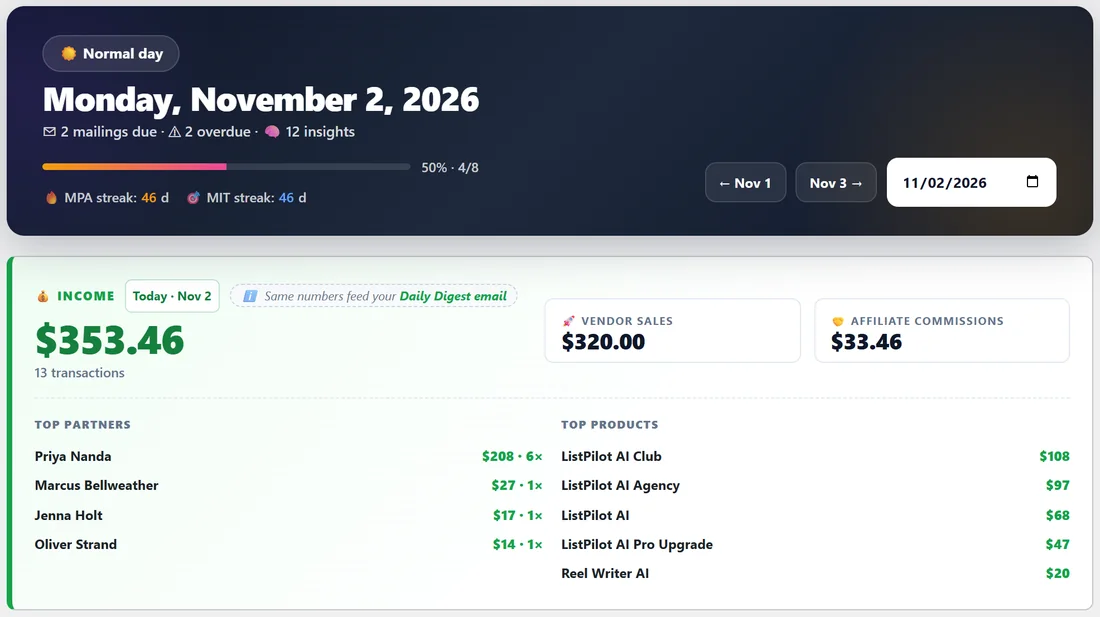
The dark bar at the top shows the date and a launch weather label worked out from your calendar. A launch that day counts three points and each mailing counts one. Eight points or more is a Heavy launch day, four or more is a Busy day, one or more is a Normal day, and nothing scheduled is a Quiet day. On a day you have marked as time off, the label shows your time off instead.
Under the date you see how many mailings are due, how many items are overdue and how many insights there are. A progress bar shows how much of the day's list is done, and two streak counters show your MPA streak and MIT streak, the number of days in a row with at least one completed.
On the right are the date buttons. Use the previous and next day buttons or the date picker to open any day. Past days show what you did. Future days let you plan ahead.
The income card:
The green Income card shows what you earned in the chosen period, with the number of transactions. Choose the period from the menu next to the title: Today, Yesterday, Last 7 Days, Last 30 Days, This Year, Last Year or All Time. Beside the total you see Vendor Sales (your own products) and Affiliate Commissions (what you earned promoting others), then your Top Partners and Top Products for the period. These are the same numbers the Daily Digest email uses.
Smart Insights:
Under the income card, Smart Insights ranks up to 12 things that need your attention, such as partners you owe a mailing, mailings still in Draft or a drop in revenue. See Smart Insights, Auto-Ranked Urgency Cards.
MPA and MIT:
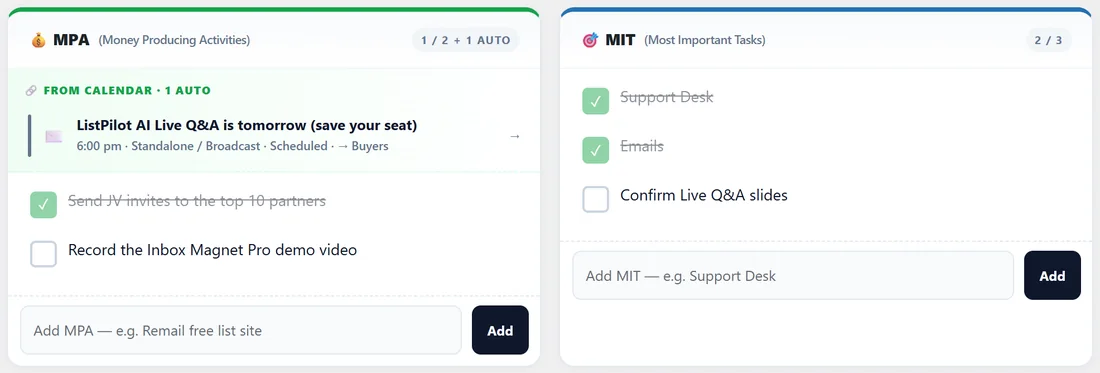
The MPA card holds your Money Producing Activities. Launches and mailings on today's calendar are added for you automatically under From Calendar. Type your own below and click Add. If nothing is planned, the card shows a red flag asking what you are doing today to make money.
The MIT card holds your Most Important Tasks, the non-negotiables such as Support Desk and Emails. Tick each one when it is done. Click a task's text to edit it. Hover a task to make it recurring with the 🔁 button or remove it with the cross.
Today's Schedule and overdue items:
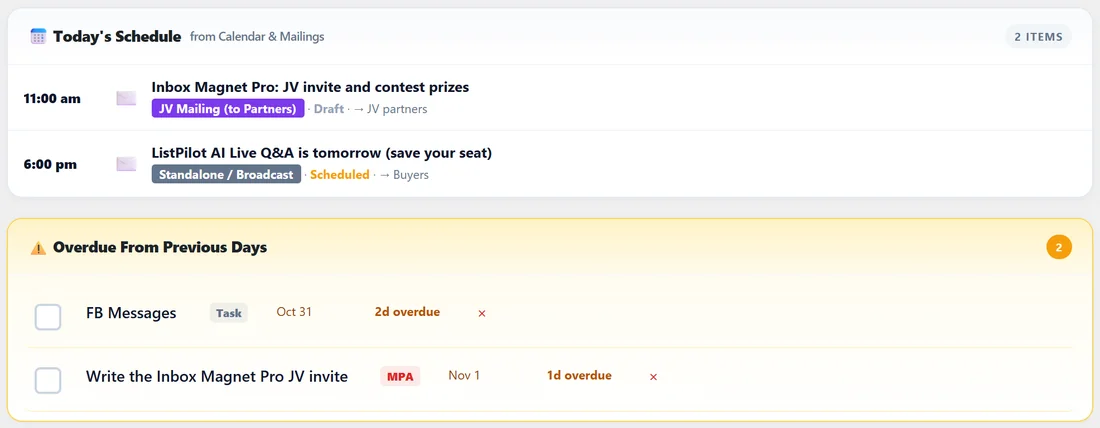
Today's Schedule lists the launches and mailings for the day with their time, type and status, pulled live from the calendar. Overdue From Previous Days lists anything you did not tick on an earlier day, with how many days overdue it is. Tick it, or clear it with the cross.
Tasks, wins and reflection:
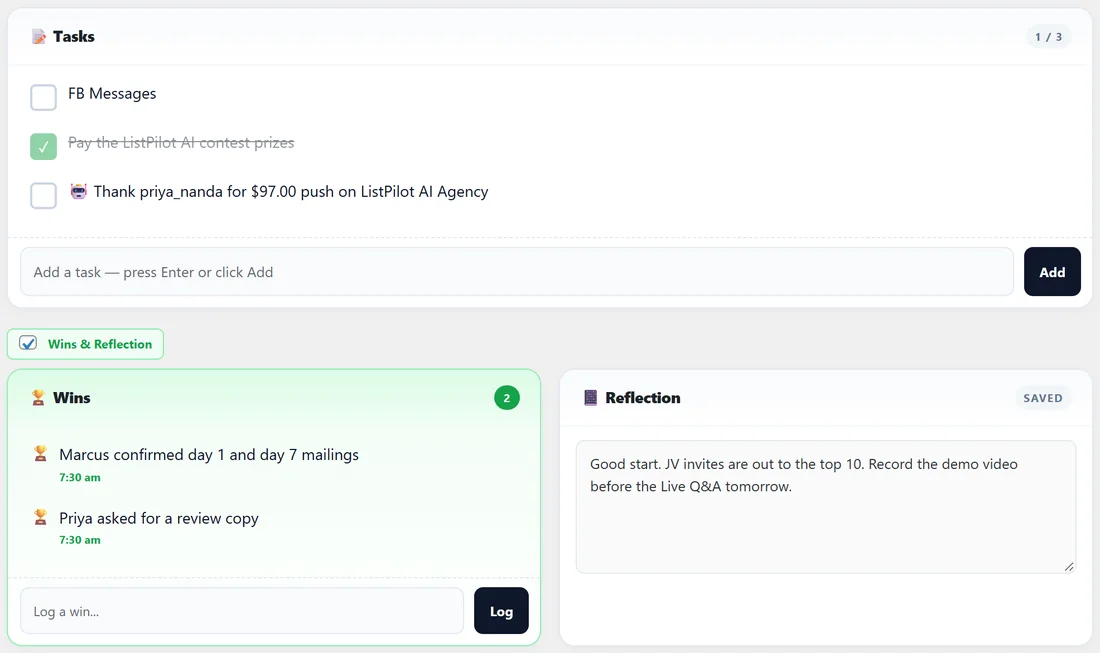
Tasks is your free list for everything else. Wins is where you log small and big wins as they happen, each with the time. Reflection is a box that saves as you type, for what happened today and what you learned. Wins and reflections feed the Review page. The Wins & Reflection switch above them hides or shows the pair.
Sticky Notes and Scratchpad:
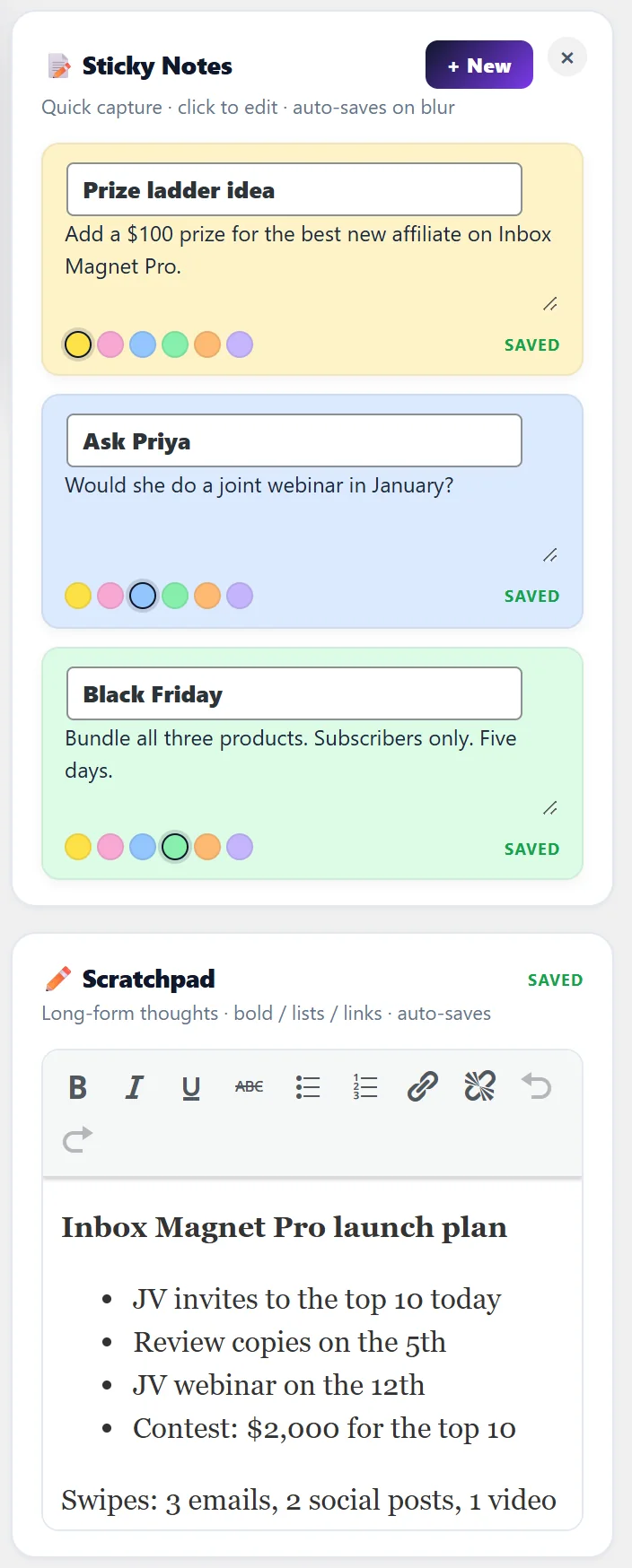
On wide screens a side panel holds Sticky Notes and a Scratchpad. Click + New for a coloured sticky note, pick a colour, and type. It saves when you click away. The Scratchpad is a single long note with bold, italics, lists and links. Both belong to you and stay the same whichever day you are viewing. Hide the panel with the cross and bring it back with Show Notes.
Step by step, a good daily routine:
- Open Today and read the hero bar and Smart Insights.
- Add one or two MPAs and your MITs if they are not already there.
- Work the list, ticking each item as you finish.
- Log wins as they happen.
- Before you finish, write two or three lines in Reflection.
A real example:
On Monday Dana opens Today. It is a Normal day with 2 mailings due and 2 overdue items. Income shows the morning's ListPilot AI sales. Her first MPA, sending JV invites to her top 10 partners, is already ticked. The second, recording the Inbox Magnet Pro demo video, is still open. Smart Insights reminds her the Inbox Magnet Pro JV invite mailing is still a draft. She logs a win when Marcus confirms two mailings.
Tips:
- Keep MPAs to one or two a day. The red flag is there to keep money work first.
- Use Recurring Tasks for anything you do every day, so Today fills itself in.
- Turn on the Daily Digest to get this page in your inbox each morning.