The partner PDF report turns everything you know about one partner into a branded, printable report. It is the easiest way to start a conversation with a partner who has gone quiet, thank a top supporter, or walk into a JV call with the facts.
How to make one:
- Open Partners and click the partner.
- Click Download PDF under the contact form.
- The report opens in a new tab and your browser's print window opens by itself.
- Choose Save as PDF as the destination and save.
You can also open it from Reports, Partner Report, or print again later with the Save as PDF / Print button at the top of the report.
What is in the report:
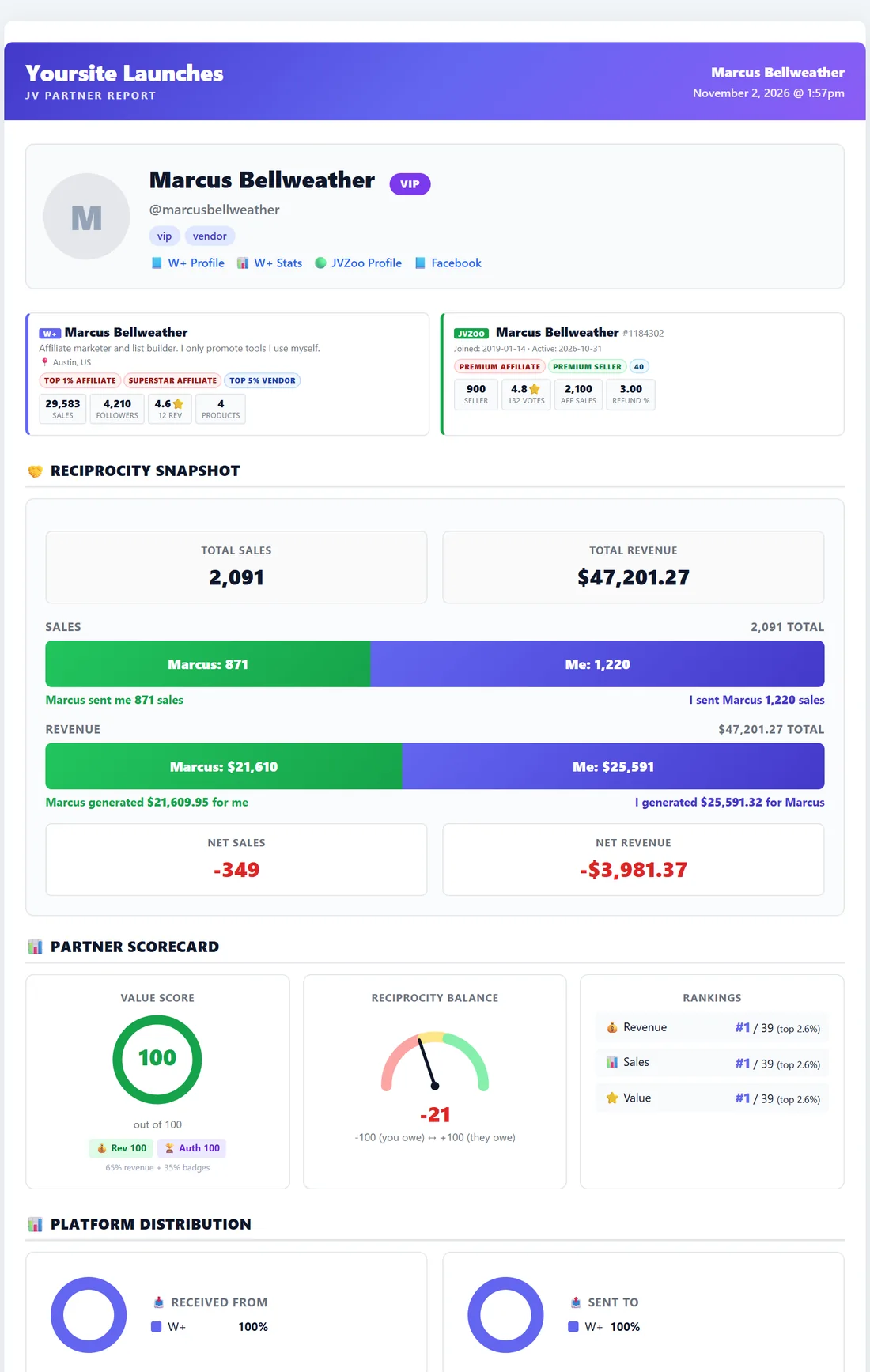
- Header: your site name, the partner's name and the date.
- Identity card: photo or initials, display name, a tier label such as VIP, tags and links to their W+ profile, W+ stats, JVZoo profile and Facebook.
- Network profile cards: their WarriorPlus and JVZoo cards side by side with badges and stats.
- 🤝 Reciprocity Snapshot: total sales and revenue between you, with bars showing each side, plus net sales and net revenue.
- 📊 Partner Scorecard: the Value Score ring with its revenue and authority parts, the Reciprocity Balance gauge, and their rank by revenue, sales and value against your whole database.
- 📊 Platform Distribution: where the sales came from on each side.
- ⚖️ W+ vs JVZoo Breakdown: sales, revenue, EPC, hops and commissions per platform.
- 📈 Key Statistics: hops, sales, revenue, conversion rate, average sale, EPC, commission and recurring totals in both directions.
- 🏆 Top Product Hall of Fame: the best product in each direction.
- 📅 Partnership Timeline: first sale, most recent sale, days active and average sales per month.
- 📥 Products they promoted for you, and 📤 Products I Promoted For them: full tables.
- 📈 More Charts & Visual Breakdowns: conversion rate, EPC comparison, average sale value, where the revenue went, and the traffic funnel.
Ways to use it:
- Reconnect with a quiet partner: send them the report as a friendly opener showing what you have built together.
- Thank your top supporters: attach it to a year-end thank-you email.
- JV meetings: hand it to a partner or launch manager so they see the relationship at a glance.
A real example:
Before Inbox Magnet Pro, Dana downloads Marcus Bellweather's report. The Reciprocity Snapshot shows 871 sales from Marcus and 1,220 from her, and the scorecard shows him ranked first by revenue. She attaches it to her JV invite with a short thank-you.
Tips:
- The report uses your browser's own print to PDF, so it needs nothing else installed. Chrome and Edge give the best results.
- Merge a partner's accounts first so the report covers every platform. See Merging Partners.
- For a one-page summary of your whole launch instead, use Export PDF on the launch. See Launch Stats, Live Sales Feed And Final Leaderboard.