Launch Manager adds up your income from every source it tracks and shows it where you plan your work: on the Revenue tab, on each day of the calendar, and on the Today page. Every new sale updates the numbers straight away.
Where the money comes from:
- WarriorPlus vendor sales: sales of your own products, through your W+ IPN.
- WarriorPlus affiliate commissions: what you earned promoting others, through your affiliate IPN.
- JVZoo vendor sales and JVZoo affiliate commissions: through JVZoo IPN or the JVZoo API import.
- W+ vendor transactions imported from CSV: your sales history.
- ResultsAiX Commerce sales (Stripe, PayPal and the other gateways Commerce runs), once you connect the feed. See Commerce Feed, Daily Digest, AR Enrich, Link Map And Shortcodes.
Sales, upsells and rebills count. Refunds and chargebacks are left out.
The Revenue overview:
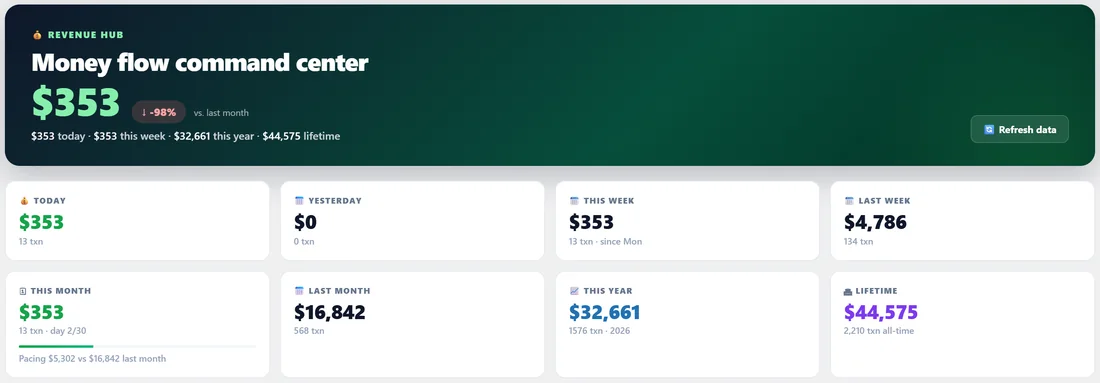
Click the Revenue tab. The top banner shows today's income and how this month compares with last month, then today, this week, this year and lifetime in one line. Below are eight tiles: Today, Yesterday, This Week, Last Week, This Month, Last Month, This Year and Lifetime, each with its transaction count. The This Month tile also shows your pacing against last month.
Further down:
- Last 30 days: a line chart of daily revenue with the peak day marked.
- Top 10 Partners and Top 10 Products this month, each with a View all link.
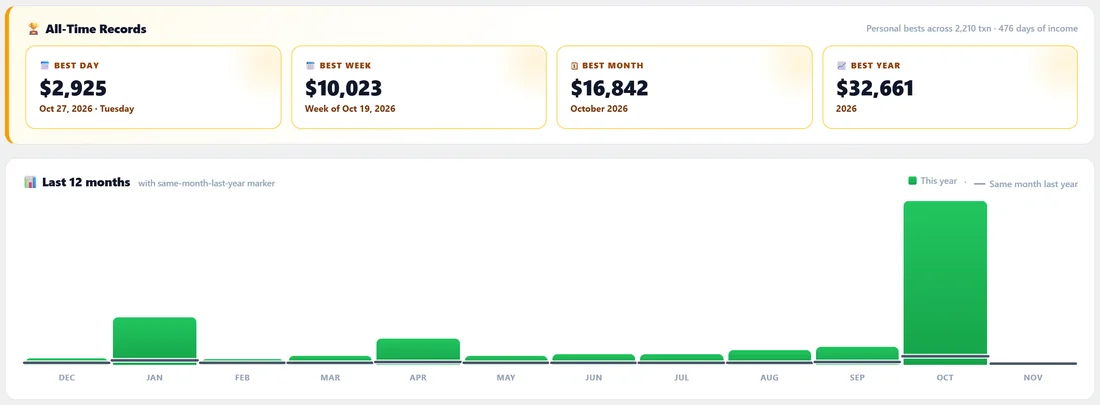
- All-Time Records: your best day, best week, best month and best year.
- Last 12 months: a bar for each month, with a marker for the same month last year.
- Recent activity: the sales from the last 24 hours.
- Drill into the data: shortcuts to All Sales, Real-Time Sales, IPN Log, Reports, Import and Partners.
The Sales page:
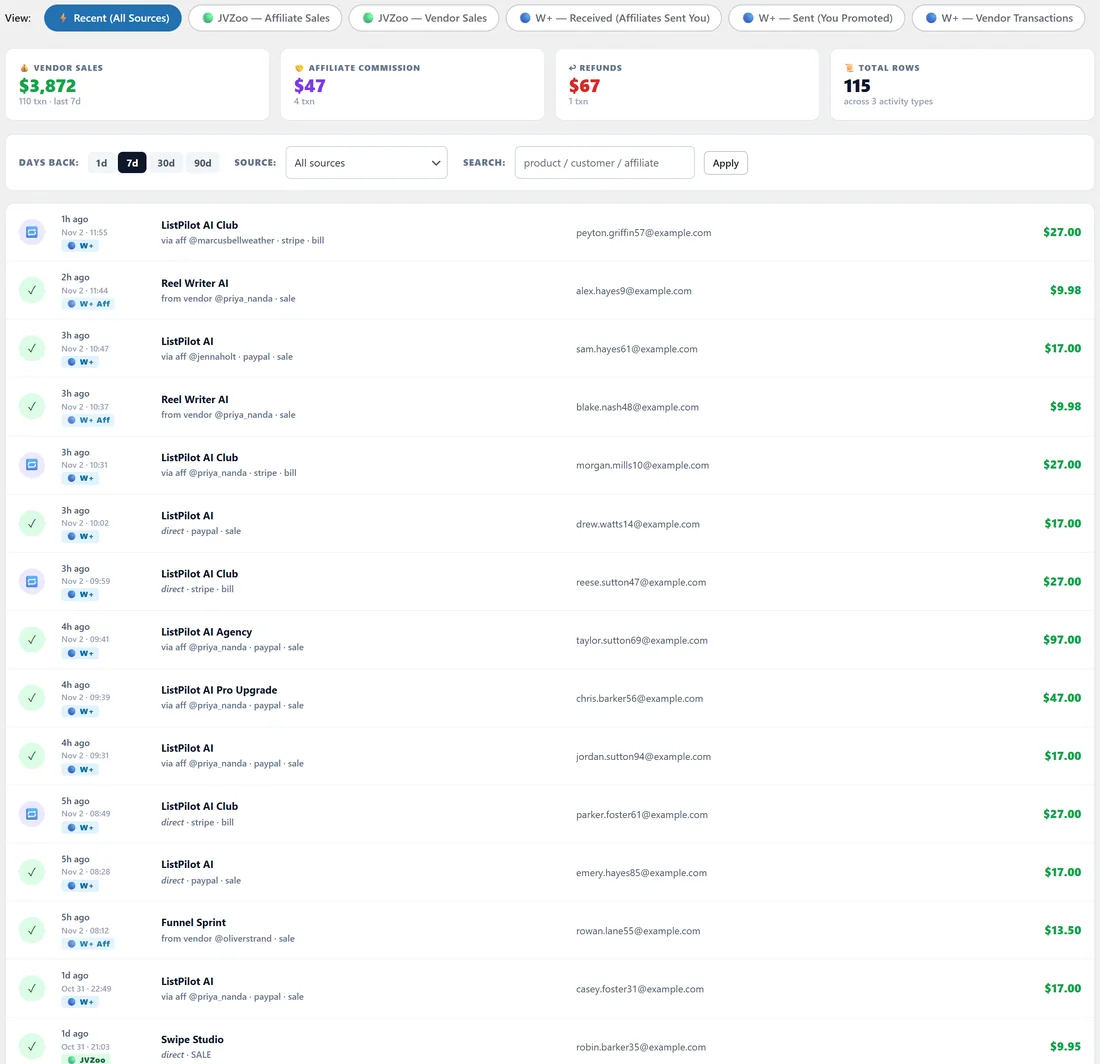
Open Revenue, then Sales, for every transaction. The View buttons at the top switch between Recent (All Sources) and each source on its own: JVZoo Affiliate Sales, JVZoo Vendor Sales, W+ Received (Affiliates Sent You), W+ Sent (You Promoted) and W+ Vendor Transactions.
Recent (All Sources) shows counters for Vendor Sales, Affiliate Commission, Refunds and Total Rows, then a feed of every sale with product, affiliate, gateway, buyer email and amount. Filter it with Days back (1, 7, 30 or 90), Source and Search, then click Apply.
On the calendar:
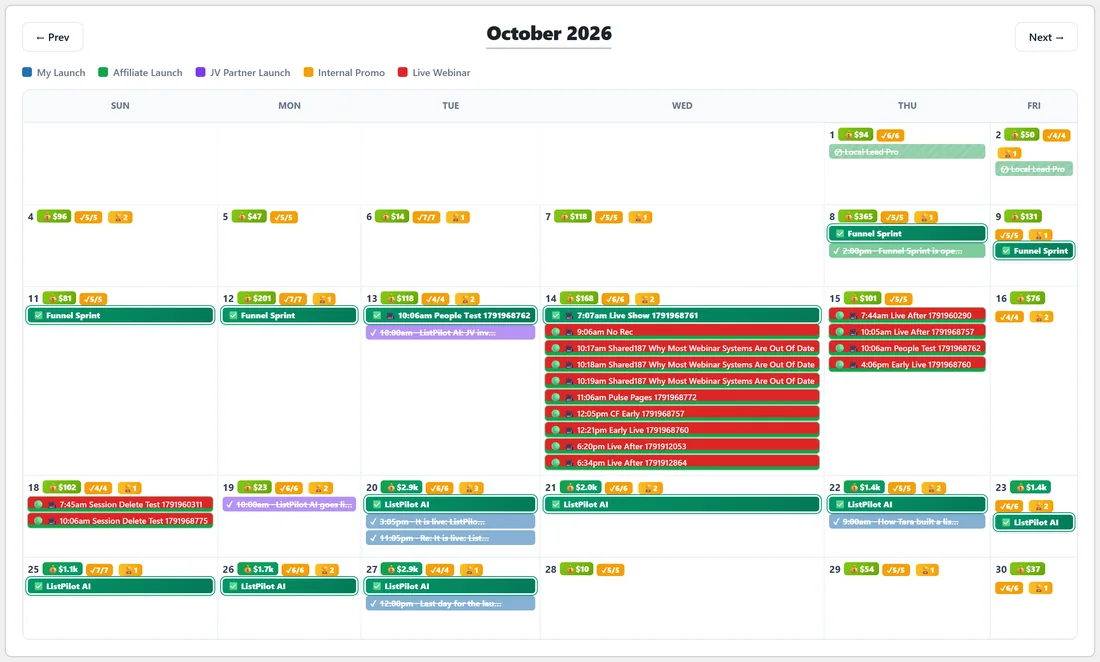
Each day on the calendar shows a small green income chip, such as $423. It is bright green when the day earned $500 or more and lime when it earned less. Days with no income show no chip. Hover a chip for the total and number of transactions, and click it to open that day on Today with the full breakdown.
At the top of the calendar the Show Income switch turns the chips on and off. It is saved for you alone, so you can switch it off before sharing your screen. When it is on, a chip next to it shows this month's total.
On the Today page:
The Income card on Today shows the total for the period you choose, split into Vendor Sales and Affiliate Commissions, with your top partners and top products. See Today Page, Your Daily Command Center.
Revenue in Smart Insights:
- Best day in 30 days appears when today's income is the highest of the last 30 days.
- Revenue down appears when the last 7 days earned less than 60% of the 7 days before.
A real example:
During the ListPilot AI launch, Dana's calendar shows big green chips from launch day to the last day. Her Revenue overview lists the launch day as her best day and October as her best month. On a screen-share with a partner she switches Show Income off first.
Tips:
- Set up IPN so new sales appear the moment they happen. See IPN, Real-Time Sales Tracking.
- Add your own usernames in Settings so your own sales never show you as your top partner.
- Use Sales Intelligence in the AI Brain for patterns such as your best hour and day of the week.