ResultsAiX Webinars runs webinars from inside your own WordPress site. The registration page, the confirmation and reminder emails, the room, the chat, the offer, the replay and every number about them live on your own domain.
You build a webinar once and it keeps working for you: live on a set date, on a repeating schedule, or on demand the moment somebody signs up. There is no monthly fee per attendee and no outside webinar account to log in to.
The three ways to deliver a webinar:
- AI Deck. Your script becomes narrated slides that play in the room against the server clock. Nothing is rendered to a video file, so the webinar is ready as soon as the narration is made.
- Recorded. Link a video you already host, pick one from your Media Library, or record one in your browser. It plays like a live show on your schedule.
- Live. Broadcast from your browser with camera and screen share, straight to your own site with no account, through your own Cloudflare Stream account for very large rooms, or by embedding a stream you run elsewhere.
All three share the same registration pages, room, chat, offer, replay, emails and analytics, so you learn the system once.
What is built in:
- Hosted registration, thank-you, room and replay pages, in eight styles, your own HTML, or a page the AI designs for you
- A split test for the registration page, with a clear winner when the numbers are in
- Sessions that are one-off, recurring, just in time or on demand, with a session picker on the form
- A confirmation email, three reminders and four follow ups based on what each person did, with open and click stats on every email
- A room with live chat, reactions, questions, raised hands, polls, handouts and scripted chat lines
- An AI assistant that can sit in your chat and answer questions, live or automated
- A Host Chat Console with moderation, pinning, a question queue and pop out windows
- A timed offer with a countdown, carrying each person's affiliate and campaign tags to your checkout
- Replays with an expiry window, and a one-click way to turn a live show into an automated webinar
- A Dashboard, per-webinar Analytics, a People list, a Leads Log and CSV export
- Direct autoresponder connections, an outbound webhook, a shortcode, an embed snippet, an API and a direct entry address for your own forms
What it looks like:
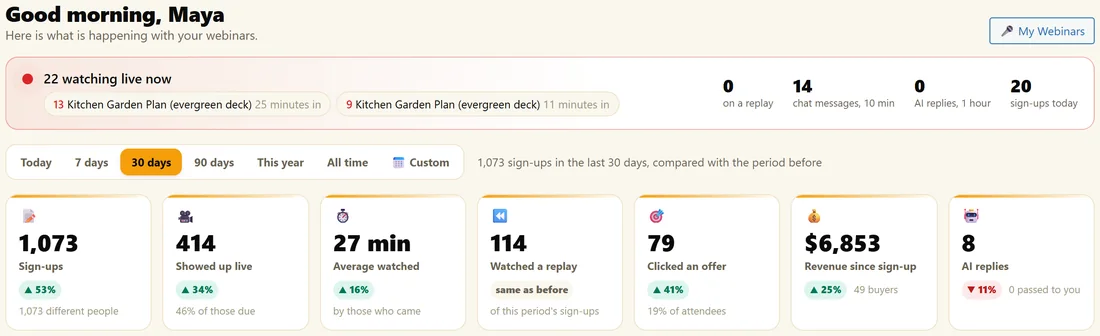
The Dashboard opens first. It shows who is watching right now, sign-ups, show-ups, replays, offer clicks and the webinars coming up next.
A real example:
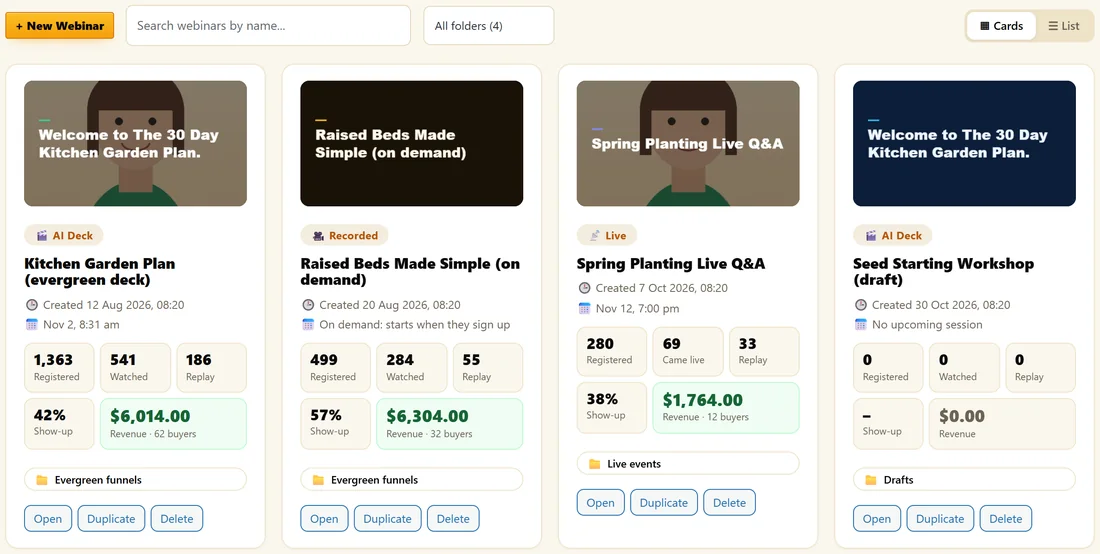
Maya runs Yoursite Garden Club at yoursite.com. Her evergreen AI Deck webinar, The 30 Day Kitchen Garden Plan, airs every Tuesday, Thursday and Saturday. Her on-demand recorded class, Raised Beds Made Simple, starts the moment someone signs up. Once a month she goes live for a Spring Planting Q&A. All three share one list, one Dashboard and one set of email settings.
What it is not:
It is a webinar platform, not a meeting tool. Attendees watch, chat, vote and click. They do not appear on camera. AI is optional everywhere it appears: you can write every word and record every video yourself.
Where to go next:
Start with Quick Start: Your First Webinar, then Finding Your Way Around The Screens.
How a webinar flows from start to finish:
- A visitor lands on your registration page, sees the next session in their own time zone and signs up.
- The thank-you page confirms their seat, offers calendar buttons and gives them a private link.
- The confirmation email arrives with the same link, and the reminders follow at 24 hours, 1 hour and 15 minutes before.
- If they open the link early, the waiting room counts down with the chat beside it.
- The show starts. They watch, chat, vote in polls and download handouts.
- At the minute you chose, the offer appears with a countdown, carrying their affiliate tags to your checkout.
- When the session ends, everyone is sorted by what they did and the right follow up email is queued.
- People who missed it get their replay link and a reminder before the replay closes.
- Every step shows on the Dashboard and the webinar's Analytics tab.
Who it suits:
- Coaches and course creators running an evergreen sales webinar every week
- Product sellers who want an on-demand demo that starts the moment someone signs up
- Anyone running a live launch or a monthly Q&A who wants the replay and follow ups handled
- Teams who want their sign-ups, attendance and sales in their own WordPress database
What you set up once:
- Email sending, on the Email screen
- Your autoresponder, if you use one
- An AI key, if you want the writing helpers and the chat assistant
- Your colour scheme and the Powered by credit, in Settings
After that, each new webinar is a few tabs: Content, Schedule, Registration, Emails and Offer.
Where your data lives:
Webinars, registrants, attendance, chat, emails and their stats are stored in your own WordPress database. You can download any webinar's people as a CSV at any time. Nothing about your audience is held on an outside webinar service.
Read these next:
- Quick Start: Your First Webinar
- Choosing Your Webinar Mode
- Choosing How Your Emails Are Sent
- The Dashboard: Your Webinars At A Glance
Common questions:
Can I run several webinars at once?
Yes. Each webinar has its own pages, schedule, emails, offer and numbers, and they can all run at the same time.
Can I start with one mode and change later?
Yes. The Delivery switch on the Content tab changes the mode, and each mode's setup is kept.