A split test shows half your visitors one version of the registration page and half another, then tells you which one gets more sign-ups. It is the simplest way to find a better headline or style.
Where to find it:
Registration tab, the Split Test This Page panel. The Split test this page button at the top jumps to it.
How it works:
- Version A is your page as it is on the Registration tab.
- Version B changes any of: the Style, the Headline, the Sub-headline and the Button text.
- Each new visitor gets A or B at random and keeps it, so the page never changes under them.
- Unique visitors and sign-ups are counted for each version.
- Your own preview never counts.
Starting a test:
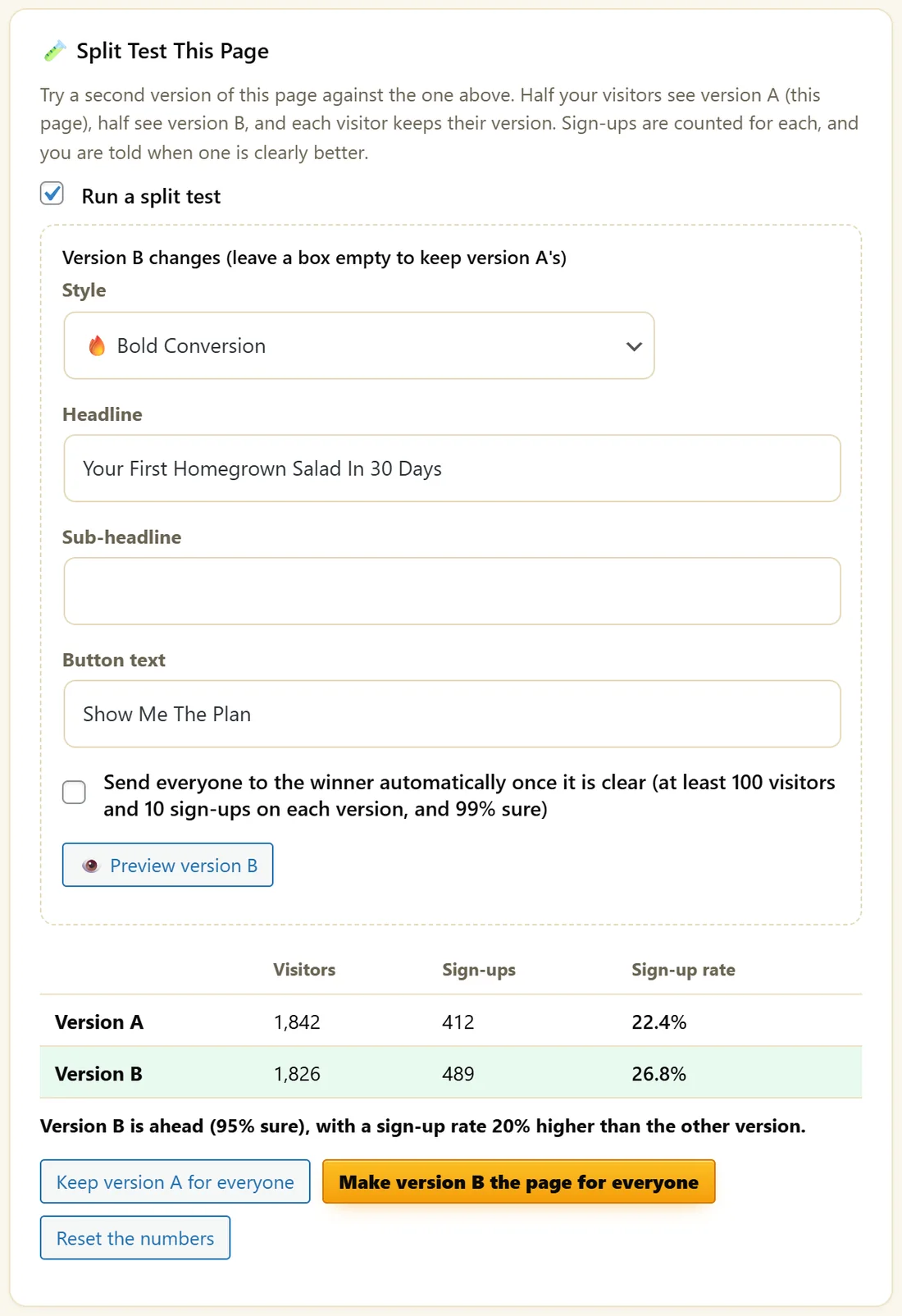
- Tick Run a split test.
- Under Version B changes, set what is different. Leave a box empty to keep version A's.
- Click Preview version B to see it.
- Click Save.
Reading the results:
The table shows Visitors, Sign-ups and Sign-up rate for each version. Under it, a line says when one version is ahead and how sure the test is, for example "Version B is ahead (95% sure), with a sign-up rate 20% higher than the other version."
Finishing the test:
- Keep version A for everyone, or Make version B the page for everyone.
- Or tick Send everyone to the winner automatically once it is clear. It switches once there are at least 100 visitors and 10 sign-ups on each version, and the result is 99% sure.
A real example:
Maya tests Bold Conversion with "Your First Homegrown Salad In 30 Days" and Show Me The Plan against her current page. After 1,842 and 1,826 visitors, version A has 22.4% and version B 26.8%. The panel says B is ahead, and she clicks Make version B the page for everyone.
Tips:
- Change one or two things at a time, so you know what made the difference.
- Let a test run through a full week of traffic before you decide.
- Every sign-up still gets the same confirmation, emails and tracking, whichever version they saw.
Good first tests:
- Headline: the result against the timeframe, for example "Grow A Full Salad Bowl" against "Your First Homegrown Salad In 30 Days".
- Style: your current style against Bold Conversion for paid traffic.
- Button text: Save My Seat against Show Me The Plan.
Previewing version B:
Preview version B opens the page as version B, for you only. Your own visits never count in the numbers.
What visitors experience:
A visitor is given A or B on their first visit and keeps it for 30 days on that browser, so they see the same page if they come back.
How sure is sure:
The test compares the two sign-up rates and says how confident it is that the difference is real. A lead with few visitors can change quickly, so let the numbers build. Automatic switching waits for at least 100 visitors and 10 sign-ups on each version and 99 percent confidence.
After a winner is chosen:
Everyone sees the winning version. To make it permanent, copy version B's headline or style into the main fields on the Registration tab, untick Run a split test and click Save.
What to do next:
- Registration Page Styles And Design Controls
- Analytics And CSV Export, to see whether the extra sign-ups also show up
Common questions:
Can I test two completely different pages?
Version B can change the style, headline, sub-headline and button text. For bigger differences, duplicate the webinar and send half your traffic to each link.
Does the test affect my emails?
No. Every sign-up gets the same confirmation, reminders and follow ups.