Optimize scores versions on real leads and sales. It listens to the plugins that already record them on your site, so there is nothing to connect or copy. If you use none of them, a test can still count a thank-you page, a click, a form, a scroll or a time on page.
Where to find it:
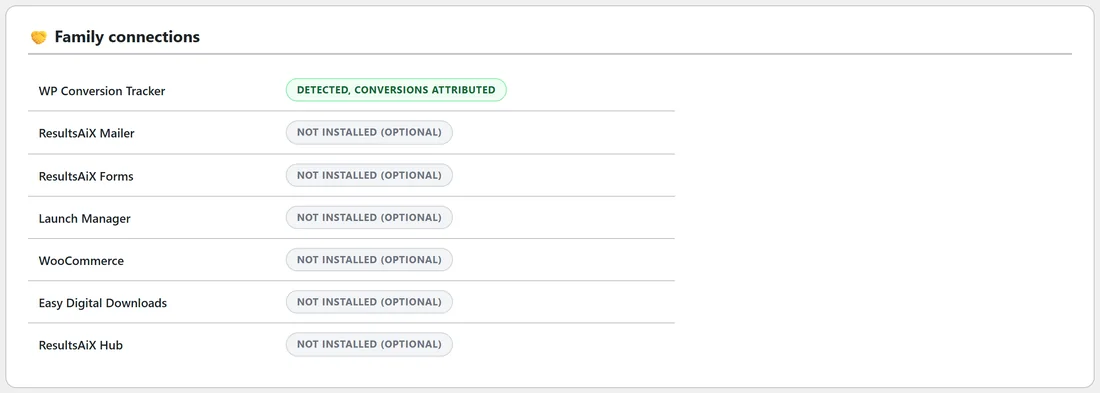
AiX Optimize, Diagnostics, Family connections. Each plugin shows Detected, conversions attributed or Not installed (optional).
What each plugin sends:
- WP Conversion Tracker: every lead and sale it records, from its pixel, payment notifications such as JVZoo, WarriorPlus and Stripe, or server-to-server calls. Sales are matched through the click id WP Conversion Tracker already stores, so a sale reported later still finds the version the buyer saw. When it stored the gross amount, Optimize counts that.
- ResultsAiX Mailer: every new subscriber counts as a lead, and sales through the Mailer count with their real amount.
- ResultsAiX Forms: every captured entry counts as a lead.
- WP Sync: every contact it captures counts as a lead.
- Launch Manager and Commerce purchases: sales from payment notifications, and money given back.
- WooCommerce: each order with its total, counted once when the order thank-you page loads. Full and partial refunds are taken off.
- Easy Digital Downloads: each completed purchase with its amount. Full and partial refunds are taken off.
- ResultsAiX Hub: Optimize shows in the Hub, gets a Hub tab, and can follow the Hub's colour scheme.
Each sale counted once:
A sale reported by both WP Conversion Tracker and the ResultsAiX Mailer is counted once. Renewals and refunds are never counted as new sales.
Which conversions count as sales:
For WP Conversion Tracker, Settings, Money events from WP Conversion Tracker that count as sales lists the conversion types that are sales. The default is sale,rebill,purchase,order. Any other conversion that carries money also counts as a sale, and a lead never does.
Money given back:
When one of these plugins reports a refund, the amount is taken off the version that earned the sale, once, however many times it is reported. For WP Conversion Tracker, the hourly check reads back its sales from the last 120 days and takes off whatever it has since marked as refunded. The report shows these in the Refunded column, and Net and Rev / visitor use the money that stayed.
Without any other plugin:
Choose one of these goals in the builder:
- Visits a thank-you page (URL), with part of the thank-you page address.
- Clicks an element (CSS selector), such as your buy button.
- Submits a form on the page.
- Scrolls past a depth (%) or Stays longer than (seconds).
- Clicks a Buy button (early signal), counted on any page with the tracking line.
- Custom, from your own code: rao_convert("sale", 49) in JavaScript, or do_action("rao_conversion", "sale", 49, "order-123") in PHP.
Other checkouts:
For a checkout none of these plugins knows, such as JVZoo, WarriorPlus, ClickBank, ThriveCart or Stripe Payment Links, use the Conversions tab. Its thank-you page line counts the sale on your thank-you page, and its postback address lets the checkout tell Optimize about each sale and refund. See Counting Leads And Sales On Any Checkout (Conversions).
See Goals And Scoring: What Counts As A Conversion.
How a conversion finds its version:
Each visitor gets a random id and their versions in cookies. A lead or sale arriving from the visitor's own browser uses those. A sale arriving later from a payment notification is matched through the WP Conversion Tracker click id, or through the visitor's code that Buy links carry to the checkout. Every running test the visitor is in gets the credit, each for the version they saw.
A real example:
Yoursite Bakery School runs WP Conversion Tracker on its sales links. When a Masterclass buyer pays, WP Conversion Tracker records the sale and Optimize adds it to the version that buyer saw, First loaf headline or the Original. When a student asks for their money back and it is marked in WP Conversion Tracker, the next hourly check takes it off that version again. The report for the Masterclass headline test shows those refunds in the Refunded column.
Tips:
- Check Family connections after installing a new plugin to confirm it is picked up.
- Use Any lead or sale when several of these plugins report to the same page.
- For a sales page, pick A sale and revenue per visitor so the money decides the winner.