The Tests tab lists every test on your site, with its status, its numbers so far and every action you need, on one screen.
Where to find it:
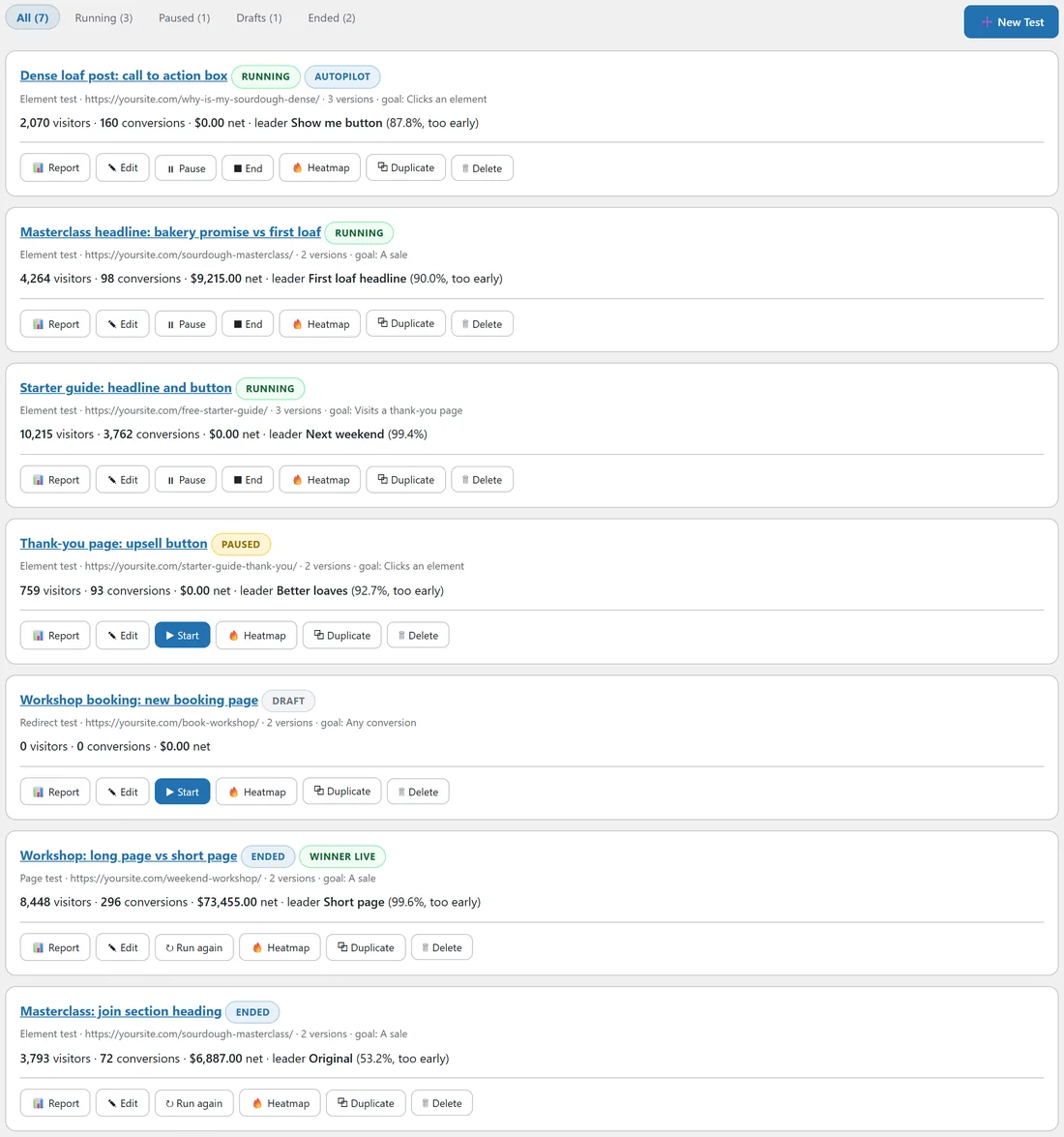
AiX Optimize, Tests. The WordPress sidebar has a Tests shortcut too.
The filters:
Across the top: All, Running, Paused, Drafts and Ended, each with how many tests it holds. The New Test button sits on the right. The list shows running tests first, then paused, drafts and ended, newest first within each.
The statuses:
- Draft: saved, not started. Visitors see the Original.
- Running: visitors are being split and counted.
- Paused: stopped for now. Visitors see the Original, nothing is counted.
- Ended: finished, with or without a winner.
Extra badges show Autopilot for that mode, and Winner live when an ended test keeps showing its winner to everyone.
Build a test with AI:
With an AI key connected, the All view opens with a Build a test with AI box. Paste a page address, say what to try in plain words and press Build it. The AI makes version B as a draft for you to check. See Building A Test With AI And The Other AI Readers.
Reading a test row:

- The first line: the test name, its status and badges.
- The second line: the kind of test, the page, how many versions, and the goal.
- The third line: visitors, conversions and net revenue so far, then the leader and its probability of being best, with too early when the test is not ready yet.
A sensible routine:
- Each morning, open the Running filter and look at the leader and the too early note on each row.
- Open the report of any test that no longer says too early.
- Once a week, open Drafts and start the next test that is ready.
- Once a month, open Ended and write down what each winner taught you in its Notes (for you).
The quick actions:
- Report: open the results.
- Edit: open the builder.
- Pause and End: on running tests.
- Start: on drafts and paused tests.
- Run again: on ended tests.
- Heatmap: open the click heatmap of the tested page.
- Duplicate: make a copy named with (copy) on the end, saved as a draft with its versions and changes, and open it in the builder.
- Delete: remove the test, its versions and all of its results, after you confirm.
End, Reset results and Delete ask you to confirm first in a small box. Start, Pause and Duplicate happen straight away.
A real example:
The Tests tab at Yoursite Bakery School shows 7 tests: 3 running, 1 paused, 1 draft and 2 ended. The paused Thank-you page: upsell button test runs on mobile and tablet only, and the owner paused it during a holiday sale. The Workshop: long page vs short page test shows Ended and Winner live. To try a new idea on the workshop page, she presses Duplicate on the ended test, renames the copy and changes Version B.
Tips:
- Use the Running filter for a quick morning check.
- Duplicate is the fastest way to start a follow-up test with the same page, goal and rules.
- Deleting removes results for good. To keep a test's history and stop it, use End instead.