A test is only worth acting on when the numbers are solid. ResultsAiX Optimize checks four things before it calls a test ready, and shows each one as a bar so you always know how close you are. The rules are sized for real lists: most tests get a few hundred visitors from an email or a post, and a big difference shows up within a few hundred visitors.
Where to find it:
On the report, in the panel Is it ready to call? The rules are set in the builder, section 4, Traffic and the winner.
The four checks:
- Visitors per version: every version must reach your minimum (100 by default).
- Conversions to compare: at least 10 conversions between the versions. With no sales or sign-ups yet there is nothing to compare.
- Days running: the test must have run your minimum number of days, so weekdays and weekends are both in the data.
- Leader's probability: the leading version's P(best) must reach your confidence (95% by default).
Ready:

When all four are met, a green box says Ready, names the leader and its probability, and offers Declare the winner while the test runs.
Not ready to call yet:
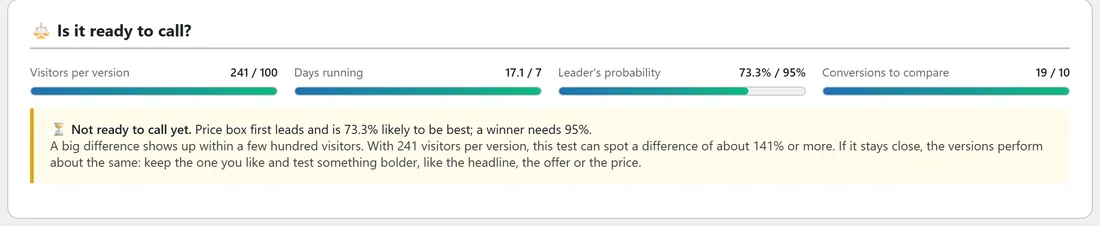
Otherwise an amber box says Not ready to call yet and lists, in plain words, what it is still waiting for: the first conversion, more visitors per version, more conversions, more days, or a clearer leader. It also says how big a difference this many visitors can spot. If the race stays close after the minimum visitors, the versions perform about the same: keep the one you like and test something bolder, such as the headline promise, the offer, the price or a bonus.
When a test is scored by revenue per visitor and has fewer than 10 sales, a note says the revenue ranking is still noisy. The conversion rate column is there beside it.
The settings behind it:
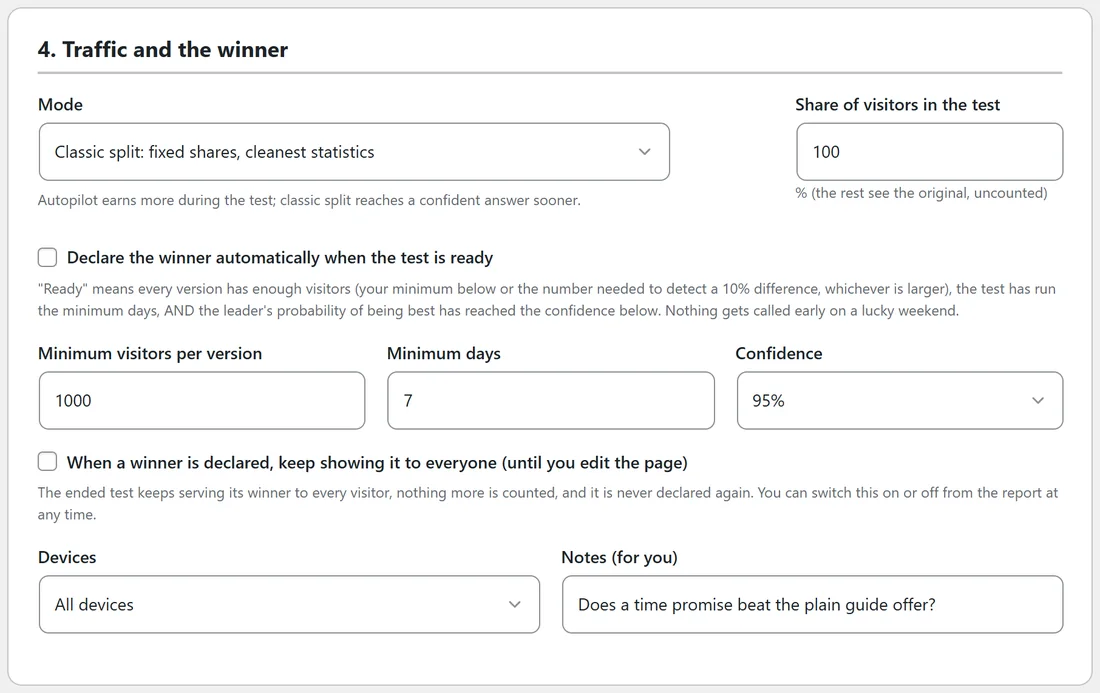
- Declare the winner automatically when the test is ready: on by default. An hourly check declares the winner once, ends the test and emails your WordPress admin address.
- Minimum visitors per version: 100 by default, from 20 to 100,000.
- Minimum days: 7 by default, from 0 to 90.
- Confidence: 90%, 95%, 98% or 99%. 95% is the default.
Choosing your numbers:
- Leave Minimum days at 7 or more, so one busy weekend never decides a test.
- Use 95% for most tests, 90% for a quick low risk change.
- With small traffic, test bold changes. A word or a colour needs huge traffic to show a difference; a new headline promise, offer or price does not.
Tip:
You can always declare a winner by hand from the report with Declare winner on any row. The readiness bars tell you how much the data supports it.