A test is won on leads and sales, so Optimize needs to know when a visitor becomes one. On this WordPress site, several plugins already tell it. For any other page and any other checkout, the Conversions tab gives you the code to copy. You can use several ways at once.
Where to find it:
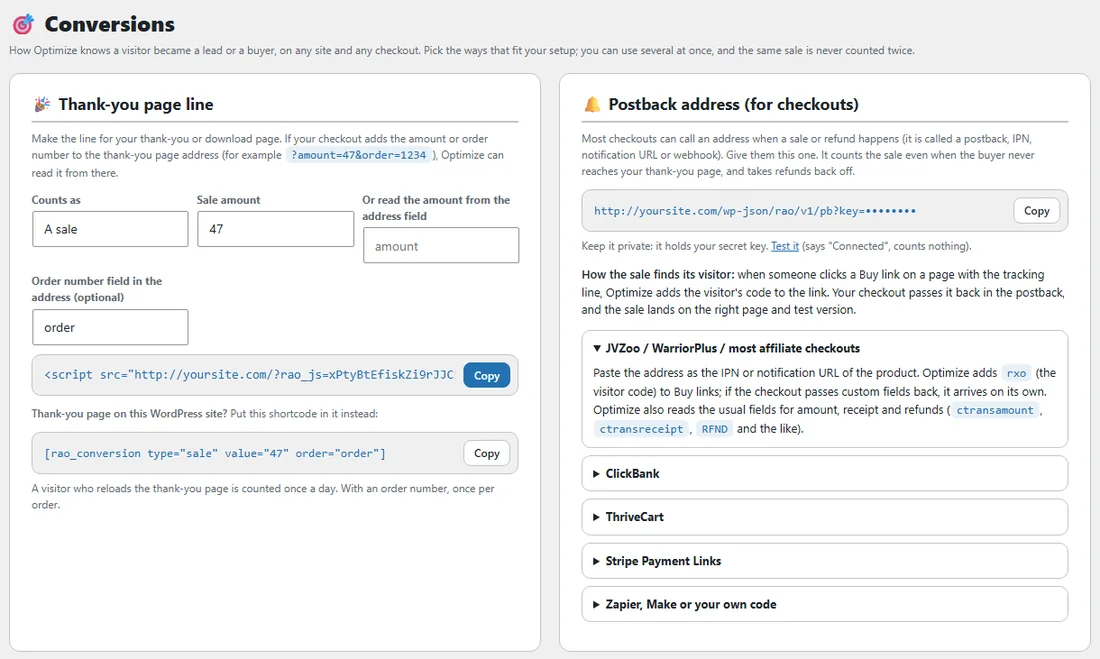
AiX Optimize, Conversions. The WordPress sidebar has a Conversions shortcut too.
The two lines:
- The tracking line goes on every page: sales pages, opt-in pages and order pages. It runs your tests and counts visits, Buy clicks, heatmaps and replays. It is the same line as on the Your sites tab.
- Your thank-you page gets the conversion line instead. It tracks the visit too, so that page needs only this one. Every visitor who lands there counts as a lead or a sale, for the test they are in and for the page that brought them.
Pages on this WordPress site are tracked already. For a thank-you page here, use the shortcode described below.
The thank-you page line:
Fill in the boxes under Thank-you page line and the line is written for you as you type.
- Counts as: A sale, or A lead (opt-in).
- Sale amount: a fixed amount, for example 47.
- Or read the amount from the address field: when your checkout adds the amount to the thank-you page address, for example ?amount=47&order=1234, type the name of that field, here amount. Each buyer's amount is then read from their address.
- Order number field in the address (optional): the field that holds the order number, here order.
Press Copy and paste the line into the head of your thank-you or download page, in place of the tracking line. A visitor who reloads the thank-you page is counted once a day. With an order number, once per order.
A thank-you page on this site:
For a thank-you page on this WordPress site, put the shortcode shown under the line into the page instead, for example [rao_conversion type="sale" value="47"]. It follows the boxes too, so a page that reads the amount and order number from its address gets [rao_conversion type="sale" value="param:amount" order="order"].
The postback address:
Most checkouts can call an address when a sale or a refund happens. It is called a postback, an IPN, a notification URL or a webhook. Postback address (for checkouts) gives you yours. It counts the sale even when the buyer never reaches your thank-you page, and takes refunds back off the version that earned the sale.
- The address holds your secret key, so part of it shows as dots. Press Copy to copy it in full, and keep it private.
- Press Test it to check it. A page saying Connected opens, and nothing is counted.
How the sale finds its visitor:
When someone clicks a Buy link on a page with the tracking line, Optimize adds the visitor's code to that link. Your checkout passes the code back in the postback, and the sale lands on the right page and test version. Each checkout carries the code in its own field:
- Most checkouts: rxo.
- ClickBank: tid.
- ThriveCart: passthrough[rxo].
- Stripe Payment Links: client_reference_id.
Setting up each checkout:
Under the postback address, each checkout has its own note. Click its name to open it.
- JVZoo, WarriorPlus and most affiliate checkouts: paste the address as the IPN or notification URL of the product. If the checkout passes custom fields back, the visitor code arrives by itself. Optimize also reads the usual fields for the amount, the receipt and refunds, such as ctransamount, ctransreceipt and RFND.
- ClickBank: Optimize adds the visitor code as tid to links to ClickBank. Send it back to the address with your sale notification tool or Zapier, adding &tid={tid}&amount={amount}&txn={receipt}.
- ThriveCart: add the address as a webhook in ThriveCart, under Settings, API and webhooks. Purchases and refunds are read from the webhook.
- Stripe Payment Links: point a Stripe webhook for checkout.session.completed at the address, directly or through Zapier or Make. The amount and the visitor code are read from the event.
- Zapier, Make or your own code: call the address with &type=sale (or lead, or refund), &amount=47, &txn=ORDER-ID and &rxo=THE-VISITOR-CODE. GET and POST both work, with form fields or JSON.
Already counted for you:
WP Conversion Tracker, ResultsAiX Mailer, ResultsAiX Forms, WP Sync, Launch Manager, WooCommerce and Easy Digital Downloads report leads and sales on this WordPress site with nothing to paste. Each one is ticked when it is installed. See Working With WP Conversion Tracker And Other ResultsAiX Plugins, Or Without Them.
Every test can also count a click on any button, a form sent, a scroll depth, time on the page or a Buy click as its goal. See Goals And Scoring: What Counts As A Conversion.
For developers:
On any page with the tracking line, call rao_convert('sale', 47, 'order-123') or rao_convert('lead') in JavaScript. In WordPress PHP, use do_action('rao_conversion', 'sale', 47, 'order-123'). The last value is your own order number, so the same order is never counted twice.
Latest conversions:
The last leads, sales and refunds Optimize counted, with the amount, where each came from (a postback, or the test it was credited to) and how long ago. After you connect a checkout, the next sale shows up here, so you can see your setup working.
A real example:
Side Income Lab sells The AI Side Income Blueprint through WarriorPlus. The owner copied the postback address, pasted it as the product's notification URL in WarriorPlus, then pressed Test it and saw Connected. The Buy button on the sales page now carries each visitor's code to the checkout, so every sale is credited to the headline version that buyer saw. For the free bonus download page, she made a thank-you page line that counts A lead.
Tips:
- Pick one way per checkout: the postback address when your checkout offers one, the thank-you page line when it does not.
- Use an order number with the thank-you page line, so each order counts once however often the page is opened.
- Check Latest conversions after your first sale on a new checkout.