Automatic descriptions come from the start of each page. On pages built with a page builder that is often a menu, a button or a heading, which makes a weak search result. The Listings Writer reads each page and writes a proper one sentence description, in bulk.
Where to find it:
Open AiX Search, then AI Tools. The AI Listings Writer is the first box.
How to use it:
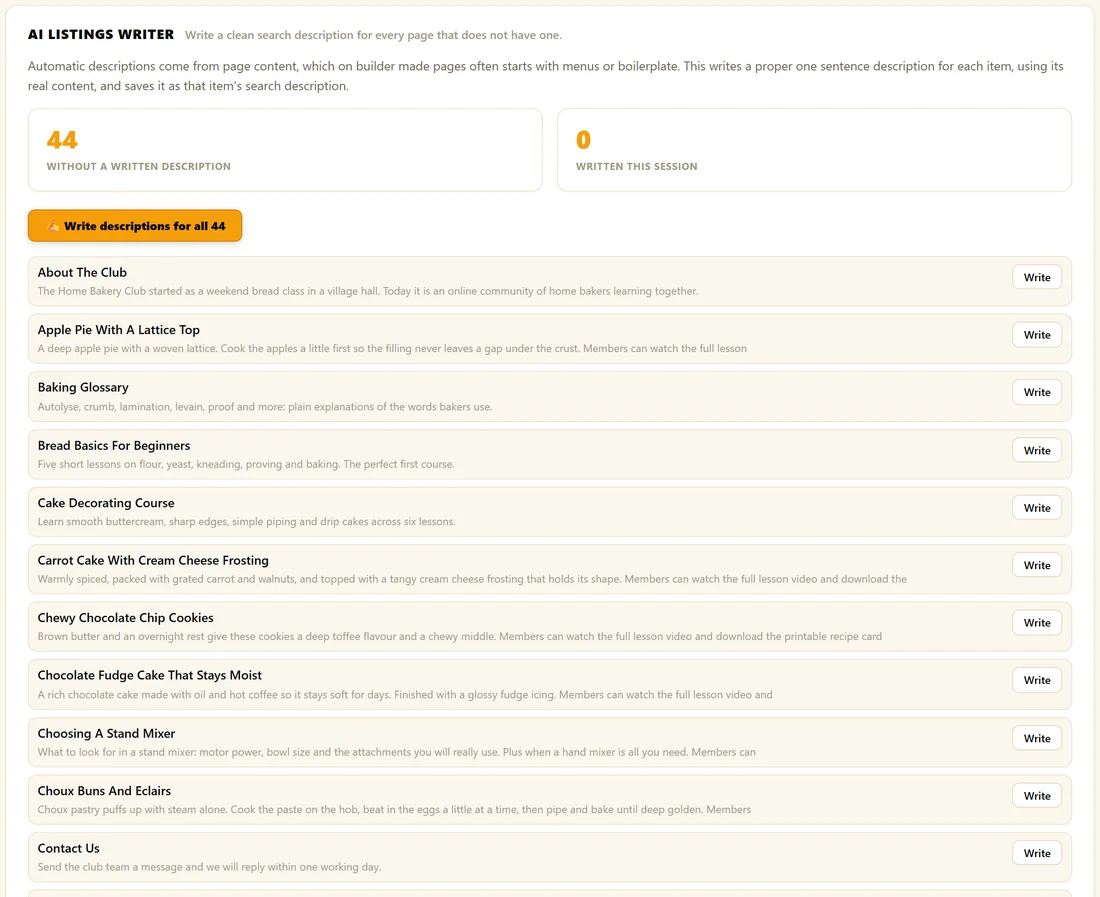
- Check the number in Without A Written Description.
- Click Write descriptions for all.
- Watch the progress bar and the log. Written This Session counts up as each one is saved.
- Click Stop at any time. Everything written before you stop is kept.
The tool works through the list one item at a time, with a short pause between items so it stays inside free tier limits. A few hundred pages take a few minutes. Keep the tab open while it runs.
One at a time:
Each row has its own Write button, so you can do a single page without running the whole list. The row shows the item's current automatic description in grey, so you can see which ones need it most.
What it writes:
One sentence of 12 to 22 words, based on the real content of that page, written to make someone want to click. It does not repeat the title.
Where the result goes:
Straight into that item's search description, exactly as if you typed it in Search Listings, and the item is updated in the index at once. You can edit or replace any description later in Search Listings or in the item's Search Listing box.
Items that already have a written description are left alone and do not appear in the list. The list shows up to 300 items at a time; run it, then reload for more.
A real example:
The Home Bakery Club had 44 items without a written description. The owner clicked Write descriptions for all and made a cup of tea. When they came back, every recipe had a one line description, and Contact Us now reads like an invitation instead of a form label.
Tips:
- Read a few results afterwards and polish any that need your voice.
- No key connected yet? The screen says so and the buttons wait until one is added. See Connecting Your AI Key.
- Each description shows as listing_desc in AI Usage.