Member Activity is the other half of the plugin's name. It records which pages each signed in member opens, so you can see what your members actually read, spot who is active and who went quiet, and show each member a pick up where you left off list.
It is part of PRO and starts recording as soon as PRO is on.
Where to find it:
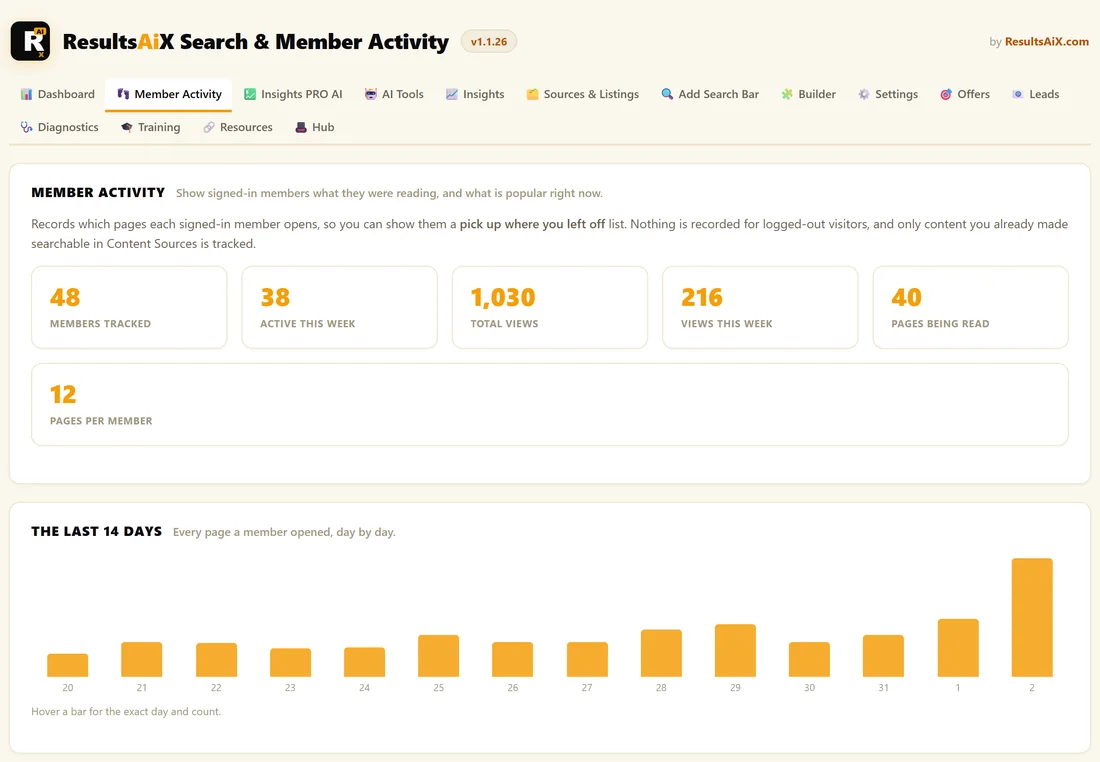
Open AiX Search, then Member Activity. The top half is a live report. The bottom half holds the settings.
What it records:
- Only signed in members. Nothing is recorded for visitors who are not signed in, and there are no cookies or anonymous sessions
- Only content you made searchable in Content Sources, and never items you excluded
- One row per member per page, with how many times they opened it and when they last did, plus one total per page per day. Nothing grows with every view, so a busy site stays fast
- Administrators keep their own reading history for their own lists, but are left out of every member number and daily total
- Pages the browser loads in advance, before anyone clicks, are not counted
The six numbers:
- Members Tracked: members with any reading recorded
- Active This Week: members who opened a page in the last 7 days
- Total Views: every page view recorded
- Views This Week: page views in the last 7 days
- Pages Being Read: how many different pages members have opened
- Pages Per Member: on average, how many different pages each member has read
The Last 14 Days:
A bar chart of member page views per day. Quiet days show as zero rather than being skipped. Hover a bar to see the date and the exact count.
What Members Are Reading:
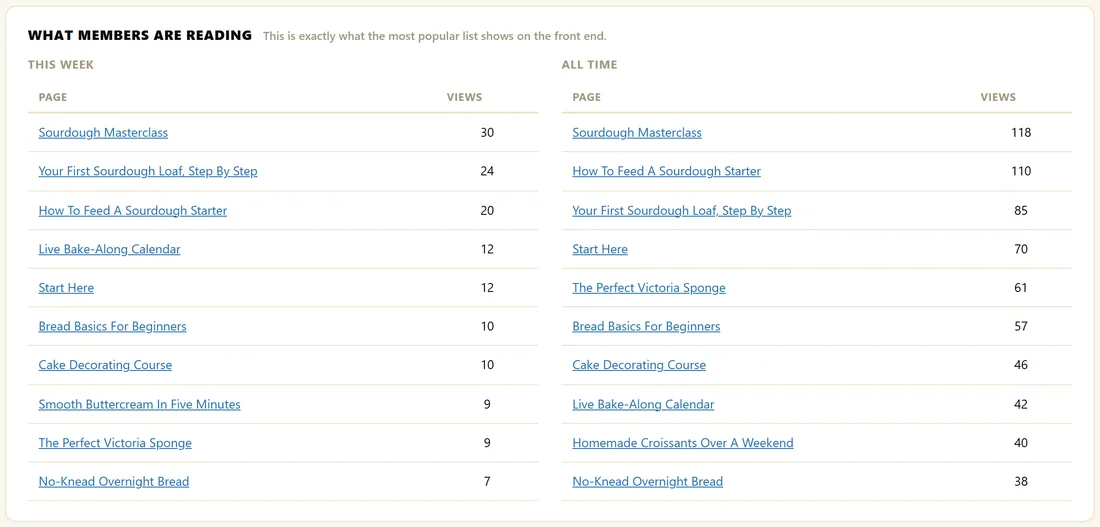
The ten most read pages this week and of all time, with view counts. This Week is exactly what the Most popular this week list shows your members on the front end.
Recently Active Members:
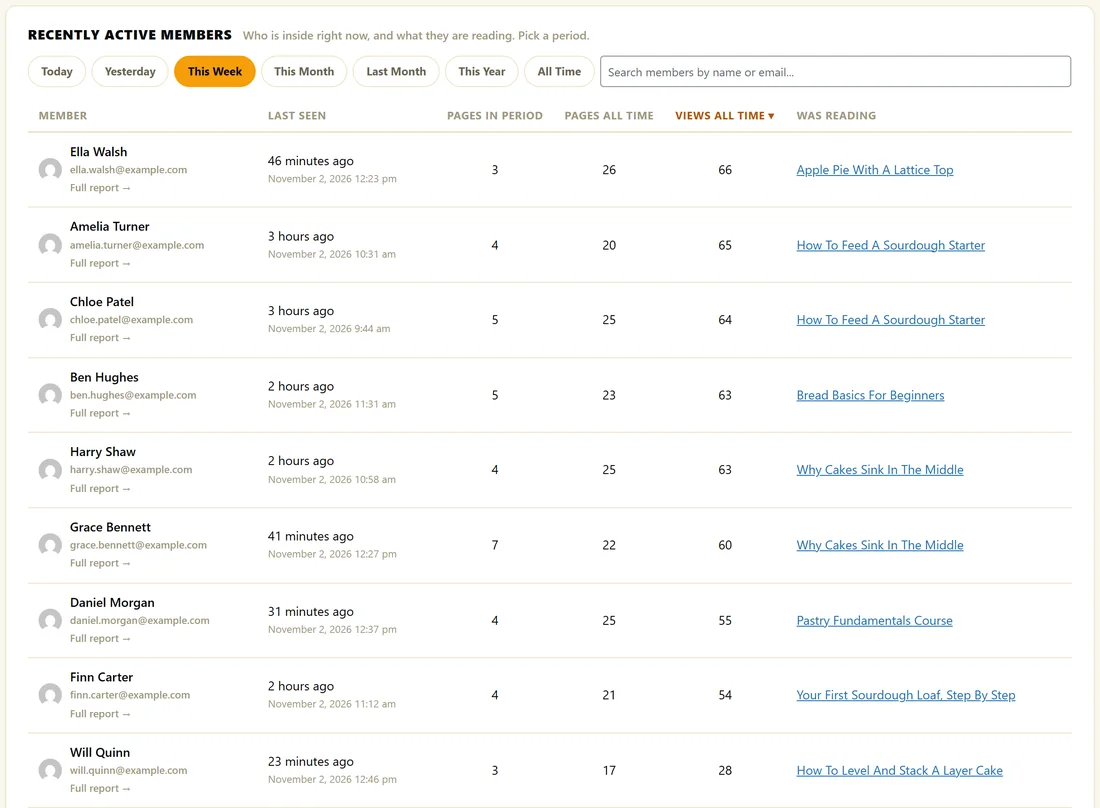
- Pick a period: Today, Yesterday, This Week, This Month, Last Month, This Year or All Time.
- Optionally type part of a name or email into the search box.
- Click a column heading to sort by Last Seen, Pages In Period, Pages All Time or Views All Time.
- Use Newer and Older to page through, 30 members at a time.
Each row shows the member's name, which opens their WordPress profile, their email, a Full report link, when they were last seen, their numbers and the page they were reading. Each period loads only when you pick it, so the screen stays quick. Administrators are left out of this table unless you search for them by name.
Every Full report link opens that member's report. See Member Reports.
Content Nobody Has Found Yet:
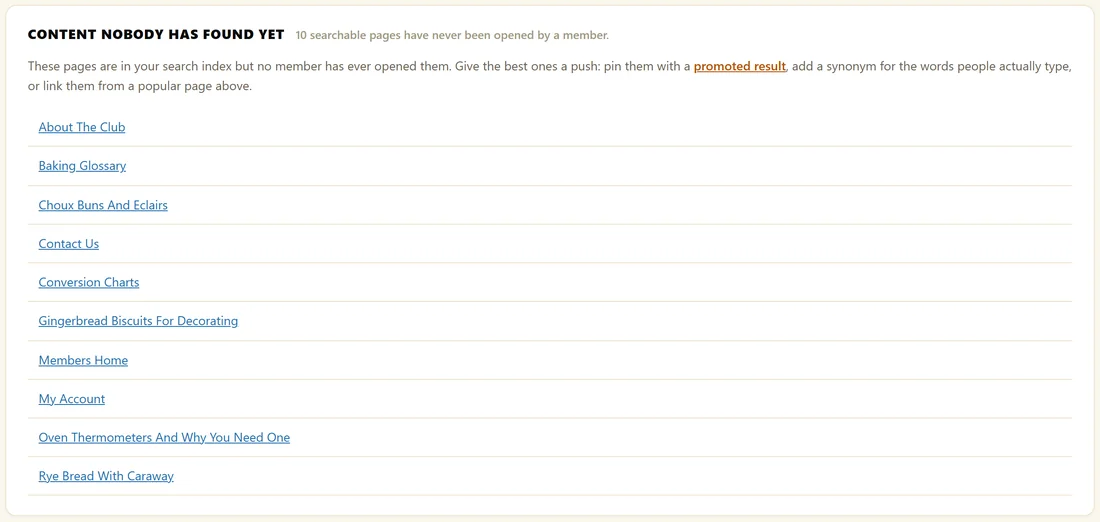
Searchable pages that no member has ever opened, with a count of how many there are and the first ten listed. Give the best of them a push: pin them with a promoted result, add a synonym for the words people really type, or link them from a popular page.
Recording:
Under Recording, tick or untick Record member activity and enable the activity blocks, then click Save Member Activity. Unticking stops recording and hides the member lists on your site.
Pages to leave out:
In Never List These Pages, type page IDs separated by commas, then click Save Member Activity. Put your members home page here, plus login, account and checkout pages. Those pages are then never counted and never appear in anyone's list. The page a member is on is always left out of its own list.
To find a page ID, open the page in the WordPress editor and look at the number after post= in the address bar.
A real example:
The Home Bakery Club has 48 members tracked, 38 of them active this week. The Sourdough Masterclass leads both This Week and All Time. Ten pages have never been opened, including Rye Bread With Caraway, so the owner linked it from the Masterclass page. Never List These Pages holds the IDs of Members Home, Member Login, My Account and Checkout.
Tips:
- Show your members their own history. See Pick Up Where You Left Off Lists.
- Already ran an activity log plugin? Bring that history in. See Importing Your Existing Member History.
- Ask the AI about this data. See The AI Analyst Report And Ask AI Anything.