On a busy site one search can return a lot. Filter chips let visitors cut the list down to one kind of content without typing anything else.
It is part of PRO and switched on by default.
Turn it on:
Open AiX Search, then Settings, click PRO Settings, and under Search Power tick Show filter chips on the full results page. Click Save PRO Settings.
What the visitor sees:

A row of chips above the results: All, then one chip for each content type in the results, using your Label In Results names, each with a count. The type with the most results comes first.
How the chips work:
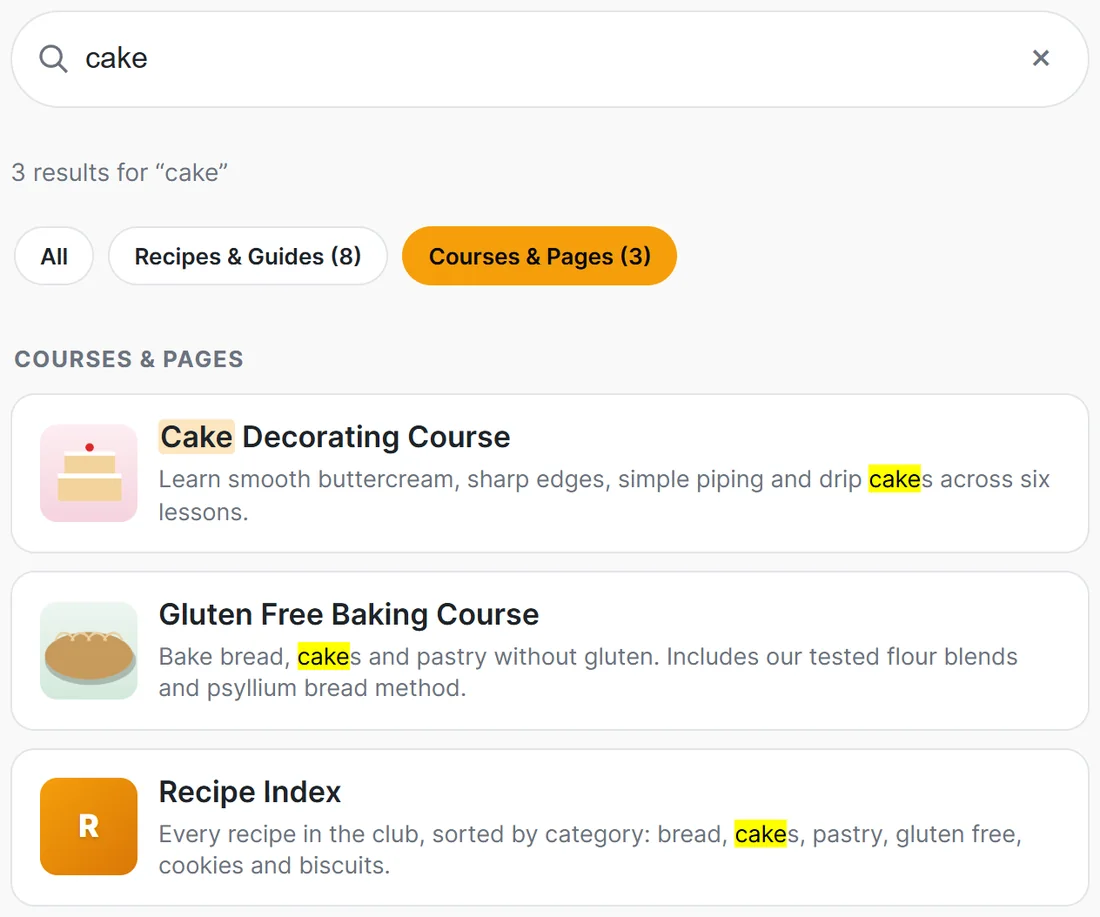
- Click a chip to show only that type. It turns orange
- Click All to bring everything back
- The counts come from the full, unfiltered results, so the numbers stay put and every chip stays visible while a filter is on
Where they appear:
On the full results page only. The dropdown stays simple and fast. Chips appear when the results come from at least two content types; a search that only finds one type has nothing to filter, so no chips show.
Good labels make good chips:
The chips use the names in Label In Results on Content Sources. Short, plain labels fit best:
- Recipes & Guides rather than Posts
- Courses & Pages rather than Pages
- Products rather than a long store name
A real example:
On The Home Bakery Club, a search for cake shows All, Recipes & Guides (8) and Courses & Pages (3). A visitor looking for a course clicks Courses & Pages and sees just the Cake Decorating Course, the Gluten Free Baking Course and the Recipe Index.
Tips:
- Clear labels make clear chips. Set them in Content Sources. See Choosing What Appears In Search.
- See The Full Search Results Page to set the page up.