When an ad link carries the keyword, Pulse keeps it with the visitor. You can then see which keyword brought each visitor, which ones turned into leads and sales, and how much money each one made. Set it up once per ad account and it works from the next click.
It works from utm_term, the standard tag for a keyword on a link. Google Ads and Microsoft Ads fill it in for you with the real keyword on every click.
What you see:
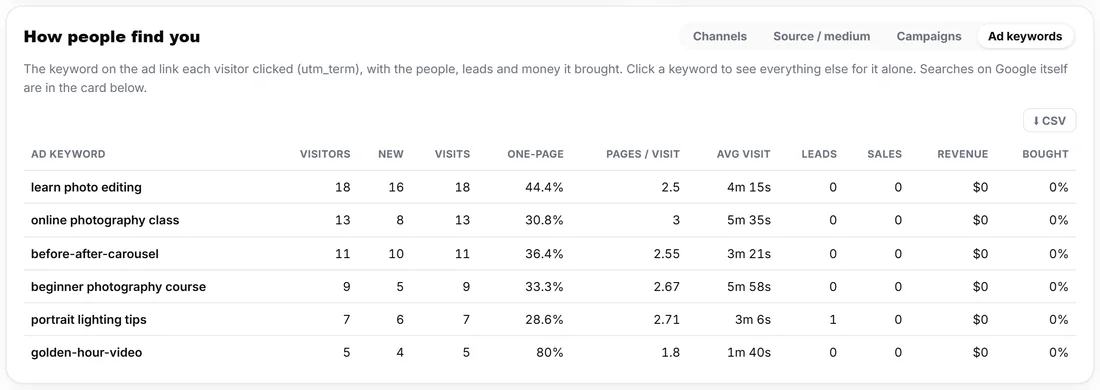
- Stats, How people find you, Ad keywords: every keyword with Visitors, New, Visits, One-page, Pages / visit, Avg visit, Leads, Sales, Revenue and Bought.
- Click a keyword and the whole Stats report narrows to it, from the headline numbers to the pages and the sales.
- A person's timeline on the People tab shows the keyword on the visit it brought, for example Came from google.com, ad keyword "learn photo editing".
- The Sales table shows the keyword beside each sale it led to.
Google Ads:
- In Google Ads press Admin (the gear), then Account settings, then Tracking.
- In Final URL suffix paste utm_source=google&utm_medium=cpc&utm_campaign={campaignid}&utm_term={keyword}
- Press Save. Google fills in the real keyword on every click.
- A campaign or ad group with its own Final URL suffix uses that one instead of the account one: add utm_term={keyword} there too.
Microsoft Ads (Bing):
- Open Settings, Account level options, and find Final URL suffix.
- Paste utm_source=bing&utm_medium=cpc&utm_campaign={CampaignId}&utm_term={keyword} and save.
Facebook and Instagram ads:
- Social ads have no keyword, but the ad's name works just as well.
- In the ad, under Tracking, URL parameters, paste utm_source=facebook&utm_medium=paid_social&utm_campaign={{campaign.name}}&utm_term={{ad.name}}
- The Ad keywords tab then shows which ad brought each person, and the visits count as Paid Social.
Any other link:
Add utm_term= and a word of your own to any link: an email, a partner's link, a QR code on a flyer. For example ?utm_source=newsletter&utm_medium=email&utm_term=october-offer.
How Pulse reads the tags:
- The keyword is read from the first page of the visit. It is stored in lowercase, up to 100 characters, and a + in a link becomes a space.
- A tag that was never filled in, such as {keyword} or [keyword], is left out, so it never shows as a keyword.
- A utm_medium of cpc, ppc, paid or similar counts as Paid Search (or Paid Social for social sources). A gclid, msclkid or similar click id counts as paid too.
- Performance Max, Display and Shopping ads have no keyword, so those visits show under their channel without one.
Ad spend beside the money:
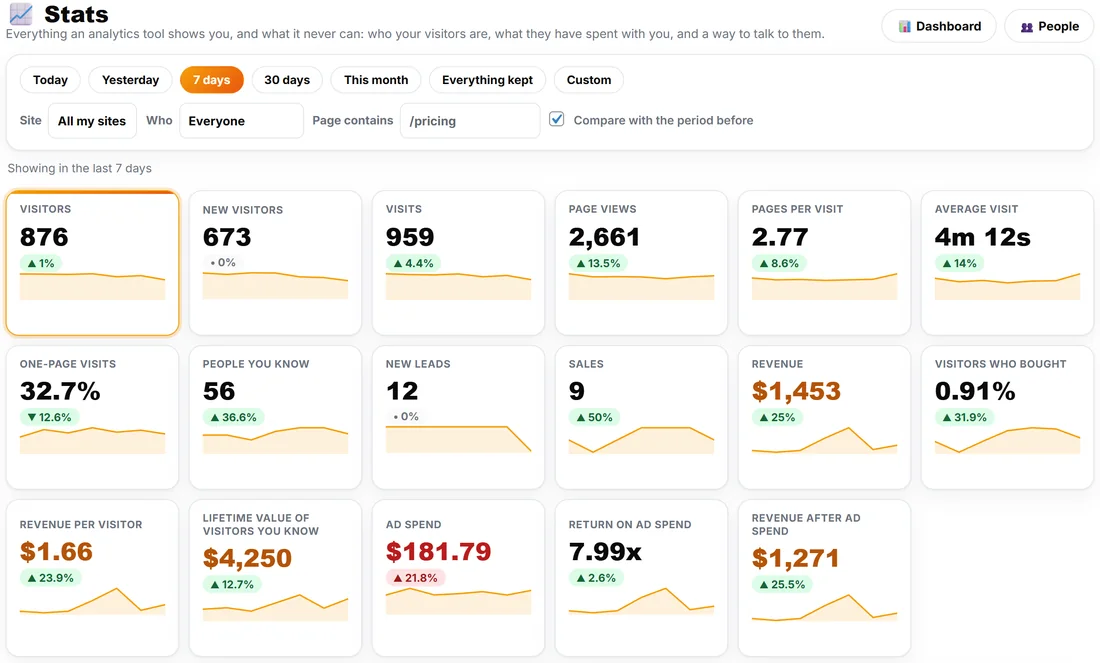
When your ad costs are recorded by WP Conversion Tracker (a cost per click on a tracking link) or ResultsAiX ADs, Stats adds Ad spend, Return on ad spend and Revenue after ad spend to the headline numbers, and the big chart can show the spend as a line. The spend covers the whole period and is not split by the filters.
A real example:
Yoursite runs a Google Ads campaign for its Photo Basics course and a Facebook video ad for the free guide. With the two suffixes in place, a week later the Ad keywords tab shows "learn photo editing" with 18 visitors, "beginner photography course" with 9, and the Facebook ad "golden-hour-video" with 5. The owner clicks "portrait lighting tips", sees it brought the week's only lead from ads, and moves budget to it.
If a keyword does not show:
- If Paid Search shows but no keyword ever does, your site may drop the first item after the ? in an address (some redirects and cache setups do). Start the suffix with _=1& so the keyword is never the first item. Diagnostics, Live Tests, Your server keeps every part of an address tells you if your server does this.
- Check the campaign or ad group does not have its own Final URL suffix without utm_term.
Tips:
- The words people typed into Google itself come from Search Console. See Google Search Words: Connect Search Console Step by Step.
- Stats has a CSV button on the table for a spreadsheet.