You make one project per product you promote. The Projects tab is where they all live, and where you open, continue or remove them.
Where to find it:
Open Bonus Builder. The Projects tab opens first. You can also click Projects under Bonus Builder in the WordPress menu.
Starting a project:
Click New Project at the top right of the tab, or in the Your bonus projects card. Before your first project, the tab shows the steps and a Start a project button.
The columns:
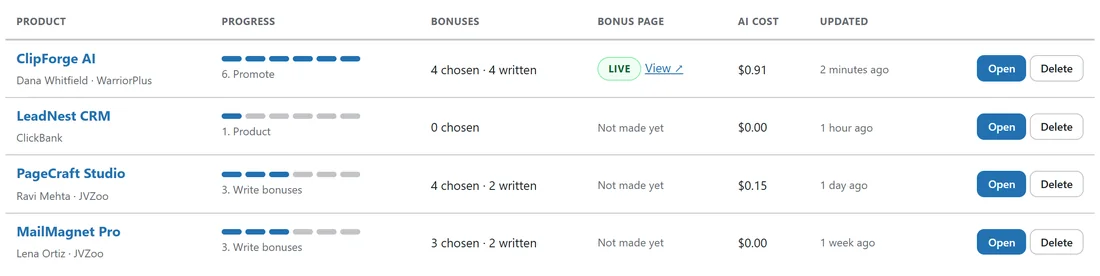
- Product. The product name, with the vendor and where it is sold underneath. Click the name to open the project.
- Progress. Six dots for the six steps, filled up to the furthest step reached, with the step name under them.
- Bonuses. How many bonuses are chosen and how many are written.
- Bonus page. Live or Draft, with a View link, or Not made yet.
- AI cost. What this project has cost in AI so far.
- Updated. When the project last changed.
The buttons:
- Open. Opens the project at the furthest step it reached.
- Delete. Removes the project and its bonuses after you confirm. Its bonus page is moved to the bin in Pages, where you can still restore it.
A real example:
Sam's list shows four promos. ClipForge AI is at 6. Promote with four bonuses written and a Live page. LeadNest CRM was added an hour ago and is still at 1. Product. PageCraft Studio is at 3. Write bonuses with two of four written, one of them copied from MailMagnet Pro, an earlier promo from last week.
Tips:
- The newest changes sit at the top, so the promo you are working on is always easy to find.
- The AI cost column makes it easy to compare what each promo cost to build.