Bonus Builder is a normal WordPress plugin. You upload it once, activate it, and enter the licence key from your purchase email. That is all the setup the plugin itself needs.
Installing the plugin:
- In WordPress, go to Plugins, then Add New Plugin, then Upload Plugin.
- Choose the plugin zip file from your download and click Install Now.
- Click Activate Plugin.
- A new Bonus Builder item appears in your WordPress menu.
Activating your licence:
- Click Bonus Builder in the WordPress menu.
- You see the Activate your license screen. Paste your key into the License key box, the one that says Your ResultsAiX Bonus Builder licence key.
- Click Activate license. The page reloads and your Projects tab opens.
Bought the Bonus Builder + 100 Done-For-You Bonuses option? Your one key opens both plugins. Paste the same key into Bonus Builder here, and into the 100 Done-For-You Bonuses add-on when you install it. Under the box, Get ResultsAiX Bonus Builder opens the product page at resultsaix.com/resultsaix-bonus-builder/, and Find it in your portal opens your account portal.
Your licence on the Settings tab:
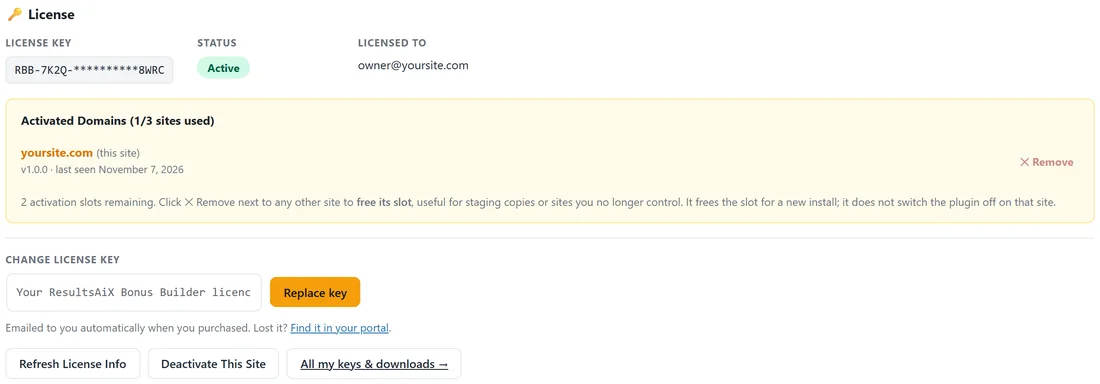
Once the plugin is active, the licence lives at the top of the Settings tab. It shows:
- License Key. Your key, partly masked.
- Status. Active when everything is set.
- Licensed To. The email address on your purchase.
- Activated Domains. The sites using this key, with a count such as 1/3 sites used. The site you are on is marked (this site).
The buttons:
- Refresh License Info. Checks your licence again and updates the details shown.
- Deactivate This Site. Frees this site's slot, for example before you move to a new domain.
- Remove. Shown next to every other site on the key. It frees that site's slot so you can use the key somewhere new, which is handy for staging copies.
- Change license key. Paste a different key and click Replace key.
How many sites:
One licence covers three sites. The count next to Activated Domains shows how many are in use.
Tips:
- Lost your key? The link under the key box, Find it in your portal, opens your account portal with all your keys and downloads.
- Your projects, bonuses and pages are kept in your own WordPress database, so updating the plugin keeps everything in place.
Next, connect your AI key: see Connecting Your AI Provider.