
ResultsAiX ADs is a WordPress plugin that runs your paid advertising from your own site. It writes the ads, creates the campaigns in your own ad accounts, builds your retargeting and customer audiences, sends your leads and sales back to each network, and shows you which ad, campaign and keyword brought each sale.
Everything lives in your own WordPress database. Every campaign arrives paused, so nothing spends until you switch it on in that network's ads manager.
What it does for you:
- Builds a campaign from any page. Paste an address and it reads the page, writes ads in several angles in your own voice, plans Google keywords and writes the Search ads.
- Plans a whole campaign in a chat. Press Build with AI, say what you want to advertise, and it proposes the networks, budgets, countries and keyword groups, then builds it when you say so.
- Builds one Google Search campaign from many pages. Each page becomes its own ad group with its own keywords and ad, sending people to that page.
- Creates the campaign on Google (Search, Gmail, YouTube, Discover, Display and Performance Max), Facebook and Instagram, TikTok, LinkedIn, Pinterest, Reddit and Snapchat.
- Updates a campaign that is already in Google Ads. You change it in ADs, see exactly what will change, and send only that.
- Connects to Google Ads the easy way, with one script pasted into your own account. No Google Cloud project is needed.
- Puts each network's tag on every page of your site, and builds website visitor audiences from them.
- Sends your subscribers, your buyers and your Audience Vault segments to the networks as audiences, kept up to date every day.
- Traces every lead and sale back to the ad click that brought it, and sends them back to each network so its AI finds more people like your buyers.
- Shows the results on the Dashboard and the Results screen, and keeps everything that did not come from an ad (your emails, webinars and own posts) separate.
- Checks every morning for campaigns to pause or scale, with Autopilot.
- Answers questions about your ads in plain English with the Ask your ads button and the AI Chat screen.
Where to find it:
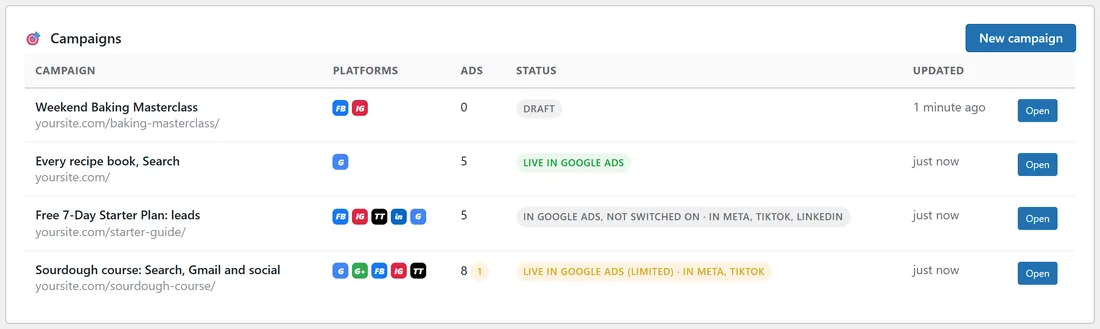
After you activate the plugin, a ResultsAiX ADs item appears in your WordPress admin menu. It opens the Dashboard. Everything else is in the menu bar along the top of every ADs screen.
A real example:
yoursite.com is a small home baking school. It sells a sourdough course and a range of recipe books, and gives away a free 7-day starter plan. With ADs the owner:
- Pasted the course page and let ADs write the ads, the keywords and the Google Search ads.
- Created the campaign on Google, Facebook, Instagram and TikTok, all paused, then switched each one on after checking it.
- Built one Google Search campaign for all five recipe books, one ad group per book page.
- Sent the buyers and the email list to Google and Meta as audiences, so buyers are kept out of ads for new customers.
- Now opens the Dashboard each morning to see clicks, leads, sales and spend for every network in one place.
How the pieces fit:
- Writing: Your Voice, the campaign screen, Images and the Compliance check.
- Sending: Google Ads, Facebook & Instagram and More networks, each connected once.
- Measuring: ad click tracking on your site, the Dashboard, Results and Autopilot.
- Audiences: the Audiences tab and step 4 of the Facebook & Instagram tab.
- Help: AI Chat, the Ask your ads button, Diagnostics, Logs and Training.
Tips:
- Start with Quick Start: Your First Campaign In Five Steps. It takes you from install to a first paused campaign.
- Add an AI key early. See AI Providers, Your AI Budget And What It Costs.
- Connect only the networks you already use. Each tab works on its own.