Audience Vault sorts every person it knows by what they really bought and when. ADs turns each of its segments into a customer list you can send to Google, Facebook and Instagram, TikTok, LinkedIn, Pinterest, Reddit and Snapchat, and keeps them in step every day.
Where to find it:
As soon as Audience Vault is on your site, the Vault lists appear:
- Networks, Audiences and tags: in Google's section 3 and in each other network's card.
- Networks, Google Ads: under Send your customer lists to Google, More lists, from Audience Vault.
- Networks, Facebook & Instagram, step 4.
The segments:
- Vault Champions: bought recently, often and for the most. The best start for a lookalike, and the first to show a new offer.
- Vault Big Spenders: everyone who has spent 1,000 or more with you.
- Vault Loyal customers: bought five times or more.
- Vault New Customers: bought recently for the first time or two. Show them the next step.
- Vault Hot Leads: known by name, not bought yet, and clicked 3 or more times in the last 7 days.
- Vault Can't Lose: your bigger spenders who have not bought for 90 days or more. Win them back.
- Vault At Risk: frequent buyers who have gone quiet for 60 days or more.
- Vault Lost and Lapsed: not seen or not bought for a year or more. A low cost win-back list, or one to keep out.
- Vault all buyers: everyone it knows has bought, including sales tracked through your links. Keep them out of ads for new customers.
- Vault leads who never bought: known by name and email, never bought.
Sending a segment:
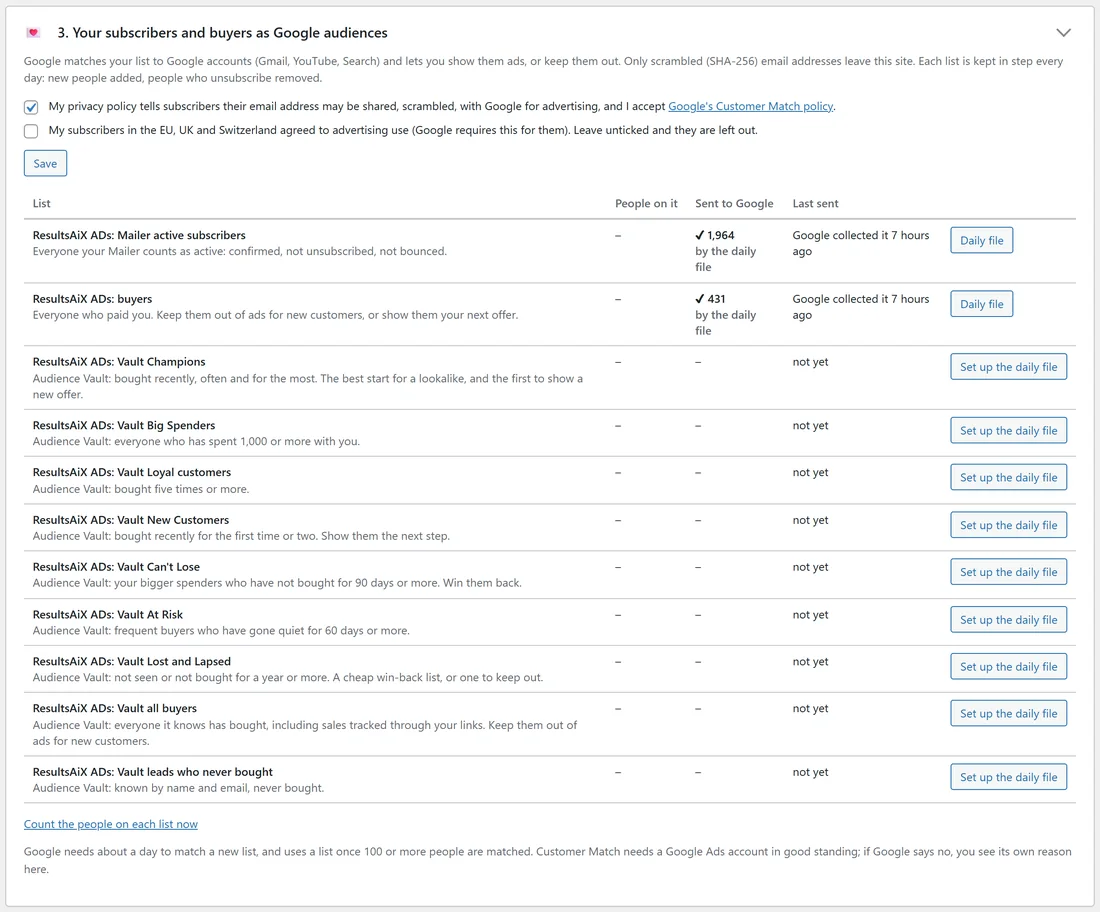
- Press Send on its line (Send to Google, Send to Meta, Send to TikTok and so on), or on the Google Ads tab with the script, Set up the daily file.
- After that each list is kept in step every day, so when someone moves from At Risk back to Champion, the lists follow.
Only people the Vault has identified by email are sent, as scrambled addresses. Masked marketplace addresses (like j***@...) are never sent. An older Vault shows the segments it supports; update the Vault to get them all.
Using them:
Once a Vault list is sent, it appears in your campaigns' audience choices: Only them, Keep out, or as the start of a Meta lookalike.
A real example:
yoursite.com runs Audience Vault. The owner sent Vault Champions to Meta and made a 1% lookalike from it for the course campaign, and sent Vault Can't Lose to Google for a small win-back Search campaign with Only them.
Tips:
- Champions and Big Spenders make the strongest lookalikes.
- Vault all buyers is the safest Keep out list, because it includes sales tracked through your links.
- Nothing is sent until you press Send.