ADs sends each lead and sale to your Meta pixel through Meta's Conversions API, from your server, every hour. Ad blockers and browser privacy settings cannot lose them. Email addresses are scrambled before they leave your site.
Where to find it:
Open Networks, Facebook & Instagram, step 3, Send your leads and sales back to Meta.
Switching it on:
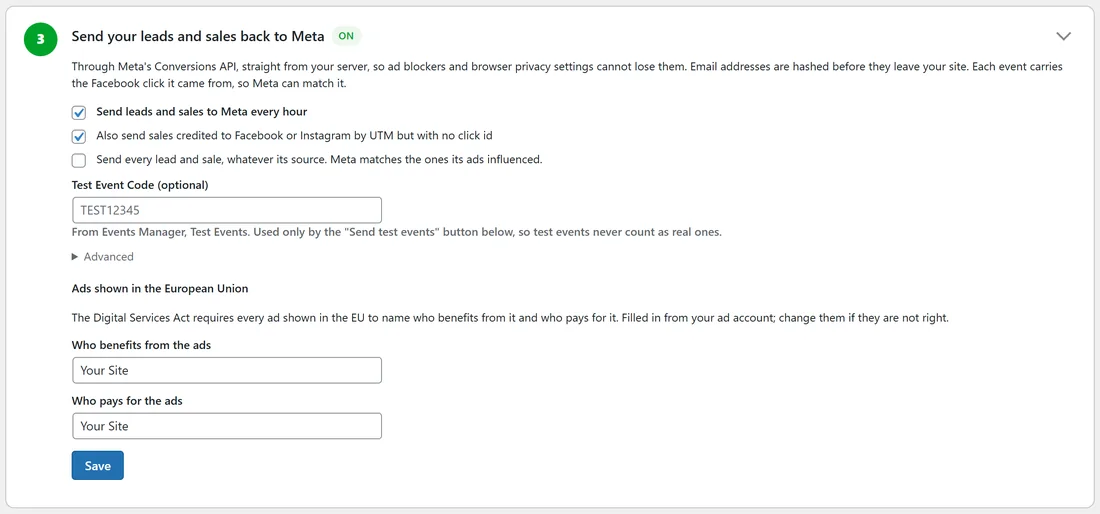
- Tick Send leads and sales to Meta every hour.
- Choose what to send:
- Leads and sales traced to a Meta click are always sent, with the Facebook click id so Meta can match them to the ad.
- Also send ones credited to Facebook or Instagram by UTM but with no click id.
- Send every lead and sale, whatever its source. Meta matches the ones its ads influenced.
- Press Save.
Testing it:
- In Meta Events Manager, Test Events, copy the test code.
- Paste it into Test Event Code (optional) and save. Only the Send test events button uses it, so test events never count as real ones.
- Press Send test events (shows in Test Events only) and watch them arrive in Events Manager.
Is it working?:
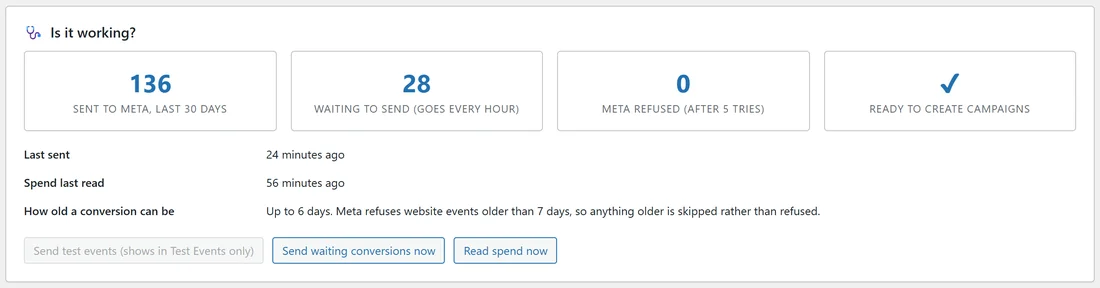
The card at the bottom shows:
- Sent to Meta, last 30 days.
- Waiting to send (goes every hour).
- Meta refused (after 5 tries).
- Ready to create campaigns, with a tick when everything is in place.
- Last sent, Spend last read, and How old a conversion can be: up to 6 days, because Meta refuses website events older than 7 days, so anything older is skipped.
Send waiting conversions now sends without waiting for the hour. Read spend now reads your Meta spend straight away for the Dashboard and Results.
Counting each sale once:
Event ids match a browser pixel that uses the order number, so nothing is counted twice. If WP Sync also sends your sales to Meta, both use the same event ids, so Meta counts each sale once.
A real example:
On yoursite.com, step 3 shows ON, with "Also send ones credited to Facebook or Instagram by UTM" ticked. The Is it working? card reads 136 sent to Meta in 30 days, 28 waiting for the next hourly run, 0 refused, and a tick for Ready to create campaigns.
Tips:
- Leave the hourly send on. Meta's delivery learns from every sale you send.
- If the waiting number grows, press Send waiting conversions now and check Logs for Meta's words.
- See How Each Sale Finds Its Ad (Click Tracking) for how a sale is tied to its click.