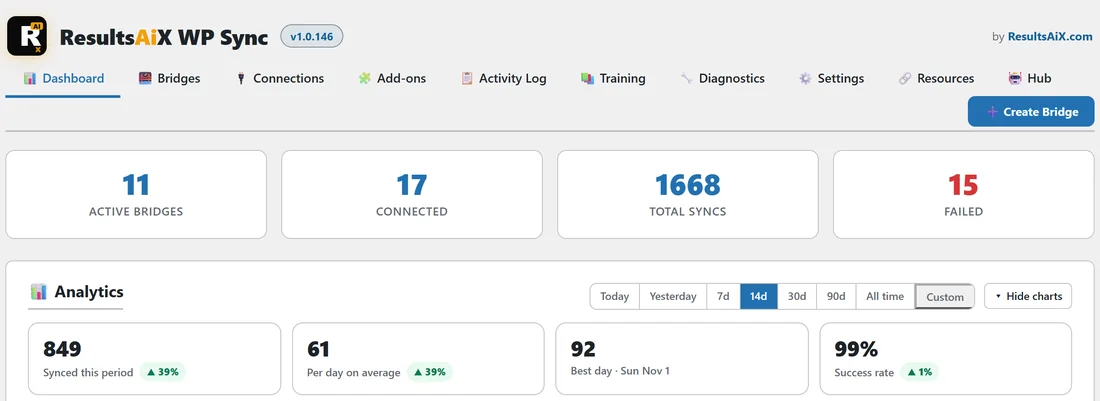
WP Sync is a WordPress plugin that moves contacts between the apps you already use. It runs on your own site, keeps your API keys and tokens in your own WordPress database, and relays every new contact automatically. Contacts never pass through a third party middleman, and there is no per task bill.
You set it up once. After that, a new buyer in your store, a new booking in your calendar or a new subscriber in one email app turns up in the other apps you chose, on its own.
What people use it for:
- Copying new subscribers out of one autoresponder and into another.
- Sending buyers, bookings, form fills and lead ad leads into your email list the moment they happen.
- Posting each new contact into a team chat channel, a spreadsheet, a help desk or a CRM.
- Fanning one contact out to several destinations at once, each with its own field mapping.
- Warming up a fresh autoresponder account by dripping contacts across at a pace you choose.
- Moving a whole list, even a very big one, from one app to another.
- Sending sales and leads to your Meta Pixel, or turning new blog posts into posts on Slack, Bluesky and other channels.
How it is organised:
Everything sits under one WP Sync item in the WordPress admin menu. Inside it there are ten tabs: Dashboard, Bridges, Connections, Add-ons, Activity Log, Training, Diagnostics, Settings, Resources and Hub, plus a Create Bridge button on the right of the tab bar. The article The Admin Tabs Explained walks through each one.
The three building blocks:
- A connection is an app you have linked on the Connections tab, such as ActiveCampaign, Stripe or Google Sheets.
- A source is a connection WP Sync reads new contacts from.
- A destination is a connection WP Sync writes contacts to.
A bridge joins one source to one or more destinations. The article The Bridge Mental Model explains the idea in full.
What comes with the core plugin:
The core plugin includes 39 built in email apps and CRMs, from ActiveCampaign to VBOUT. AWeber has two cards because it has two ways to connect, so there are 40 autoresponder cards in all. Two optional packs add more. The Pro Pack adds 13 connectors for forms, webhooks, spreadsheets, webinars and project tools. The Connect Pack adds 125 apps such as stores, payment platforms, calendars, lead ads, course platforms, chat channels and help desks. With both packs active the Add-ons tab counts 177 connections in all. A built in ResultsAiX Payments source for the ResultsAiX family sits on top of that.
A day in the life of a bridge:
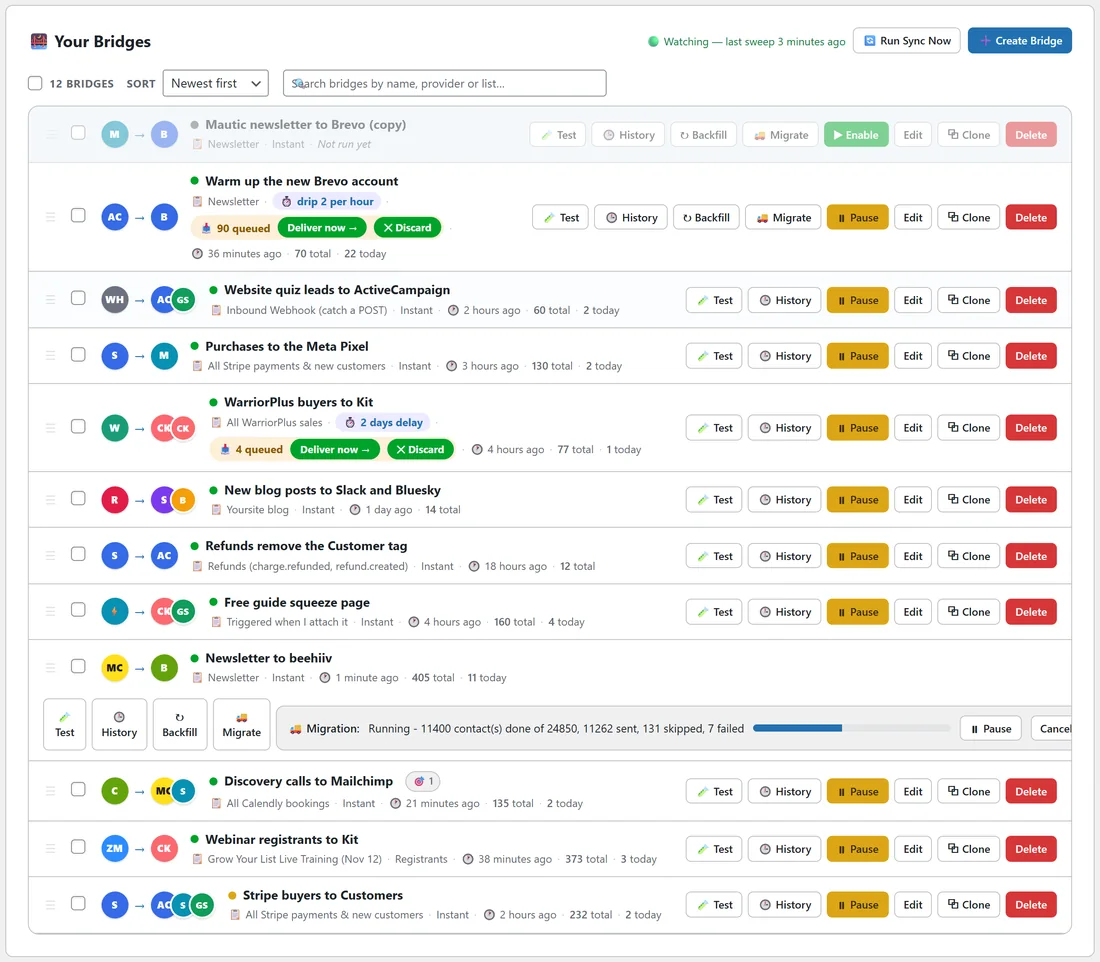
Take yoursite.com, a small online business. It sells a course through Stripe, runs webinars on Zoom and books discovery calls in Calendly. It has a bridge called Stripe buyers to Customers. When somebody pays, Stripe tells WP Sync straight away. WP Sync adds the buyer to the Customers list in ActiveCampaign with a Customer tag, posts a message in the #sales Slack channel and appends a row to the Sales log sheet. One row in the Activity Log records all three results. Nobody touched a thing.
What a new bridge does with people already on a list:
A new bridge relays people who appear in the source after the bridge starts watching, so it never sweeps a whole list into a destination by surprise. To bring across the people who were already on a list, use Backfill for an ordinary list, or Migrate for a really big one. Each has its own article.
What WP Sync leaves to your other apps:
WP Sync does not send your emails. It hands each contact to the app you picked as the destination, and that app does the sending, the welcome sequence and the unsubscribe links, exactly as it does today.
Where to go next:
- Read The Bridge Mental Model so the words source, destination and bridge feel natural.
- Follow Installing And Activating WP Sync.
- Connect two apps, using Connecting Your First Autoresponder.
- Build your first bridge with Building Your First Bridge Step By Step.
A short glossary:
- Connection: an app linked on the Connections tab.
- Source: where new contacts come from.
- Destination: where contacts are sent.
- Bridge: one source joined to one or more destinations.
- Push: the source tells your site the moment something happens.
- Poll: WP Sync asks the source every five minutes.
- Action: what a destination does, such as Add to list or Add tag.
- Delay: hold a contact for a while before a destination.
- Drip: space contacts out at a steady pace.
- Backfill and Migrate: bring across people already on a list.
The bridges yoursite.com runs:
- Stripe buyers to Customers: Stripe to ActiveCampaign, Slack and Google Sheets.
- Webinar registrants to Kit: Zoom to Kit.
- Discovery calls to Mailchimp: Calendly to Mailchimp and Slack, with a filter.
- Newsletter to beehiiv: Mailchimp to beehiiv, with a migration running.
- Warm up the new Brevo account: ActiveCampaign to Brevo, with a drip.
- Refunds remove the Customer tag: Stripe refunds to ActiveCampaign, Remove tag.
- New blog posts to Slack and Bluesky: RSS Feed to Slack Post and Bluesky.
- WarriorPlus buyers to Kit: WarriorPlus to Kit, with a delayed review tag.
- Purchases to the Meta Pixel: Stripe to Meta Conversions (CAPI).
- Website quiz leads to ActiveCampaign: Webhook Connect to ActiveCampaign and Google Sheets.
- Free guide squeeze page: a hand coded form to Kit and Google Sheets.
Each one has a worked example somewhere in these docs.