Diagnostics is a health report for the plugin and your site. It shows the things support asks about first, and copies them into a report you can paste into a ticket, so a question can usually be answered in one reply.
Where to find it:
Open AiX Funnels, then Diagnostics. The Open Diagnostics button on the Settings tab goes to the same place.
The buttons at the top:

- Copy Report for Support: copies the full report to your clipboard. The button confirms it with Copied! Paste into your support ticket.
- Open Support: opens the support desk in a new tab.
No passwords or API keys are ever included in the report.
The Plugin card:
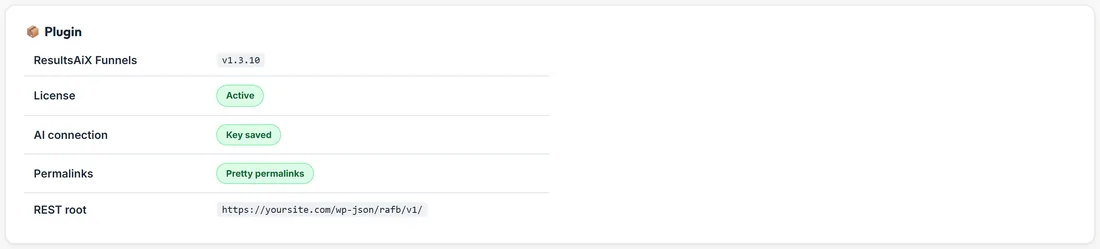
- ResultsAiX Funnels: the version you are running, for example v1.3.10
- License: Active when your licence is active
- AI connection: Key saved when at least one AI key is saved, or a pointer to Connect AI when none is
- Permalinks: Pretty permalinks when your site uses them. Funnel pages need pretty permalinks to load at their addresses
- REST root: the address the builder and your forms talk to
The Environment card:
WordPress, PHP, MySQL or MariaDB, Site URL, HTTPS / SSL, Memory limit and Max execution, the time your host allows one request to run.
The Database Tables card:
Lists the plugin's tables with how many rows each holds. For your AI jobs, the AI Usage card on Connect AI is the place to look.
What the checks mean for you:
- License shows Active: the builder and every AI feature are available
- AI connection shows Key saved: Generate My Funnel, Import Page and the rewrite tools can run
- Permalinks shows Pretty permalinks: published funnel pages load at their own addresses, like yoursite.com/free-meal-prep-guide/
- HTTPS / SSL shows Active on a live site with a certificate, which visitors and ad platforms expect
- Memory limit and Max execution come from your host. If you ever need them raised, your host's support can do it
Sending a report, step by step:
- Open Diagnostics.
- Press Copy Report for Support.
- Press Open Support and start a ticket.
- Paste the report into your message, and add what you were doing and the exact message you saw.
A real example:
When Sarah's published pages once showed a not found page, Diagnostics showed Permalinks set to plain. She switched WordPress to pretty permalinks under Settings, Permalinks, published again, and the pages loaded.
Tips:
- Check Diagnostics after moving your site to a new host. Memory limit and Max execution often change.
- Long builds finish even on hosts with a short Max execution, because the builder keeps waiting for the finished result. A higher limit simply gives the AI more room.