You bring your own AI key and pay your provider directly. The AI Usage card answers what is this costing me without opening your provider's dashboard.
Where to find it:
Open AiX Funnels, then Connect AI, and scroll to the AI Usage card at the bottom. The Monthly Soft Budget box is on the Routing card above it.
The four figures:
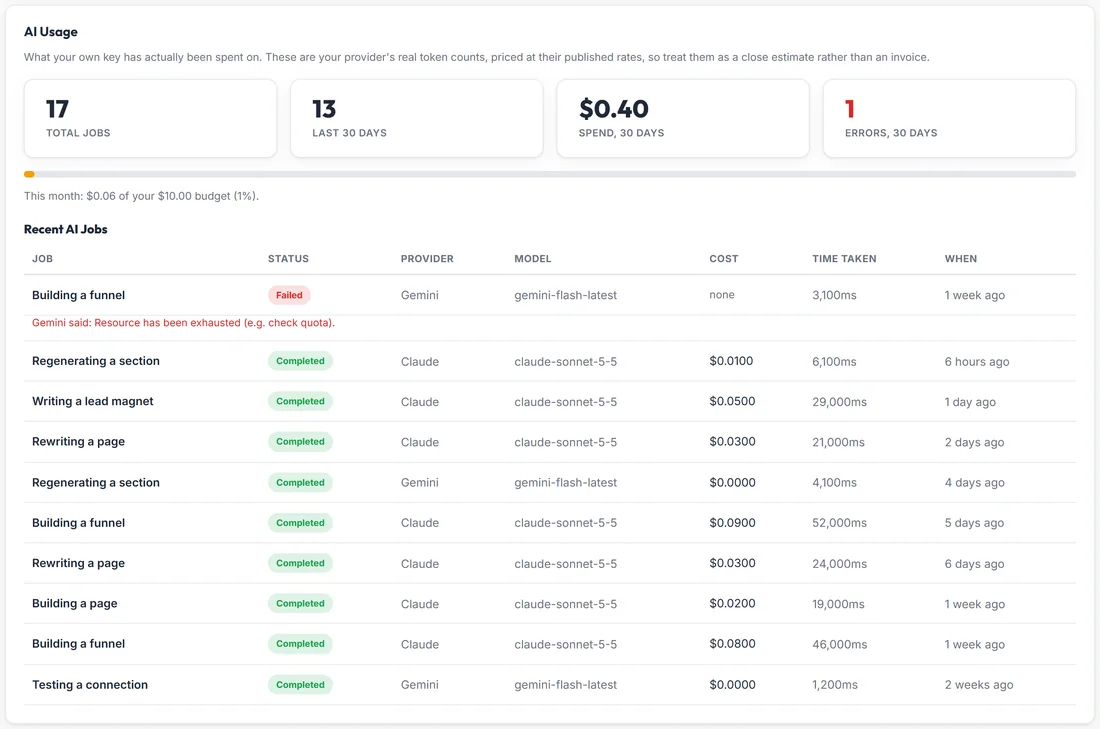
- Total Jobs: every AI call this plugin has made
- Last 30 Days: jobs in the last 30 days
- Spend, 30 Days: your provider's real token counts, priced at their published rates
- Errors, 30 Days: failed calls, which cost you nothing, shown so a broken key cannot hide. It turns red when it is above zero
These are a close estimate rather than an invoice: your provider's own token counts at their published prices.
Recent AI Jobs:
The last ten calls, each with the following.
- Job: what it was for, in plain words: Building a funnel, Building a page, Importing a page, Regenerating a section, Rewriting a page, Writing a lead magnet, Testing a connection, or Fixing AI output when the plugin asked the AI to tidy a reply
- Status: Completed or Failed
- Provider and Model
- Cost: what it cost, or none for a failed call
- Time Taken and When
A failed job prints the provider's own message underneath it, which is the fastest way to see that a key was replaced, credit ran out or a model was retired.
The monthly soft budget:
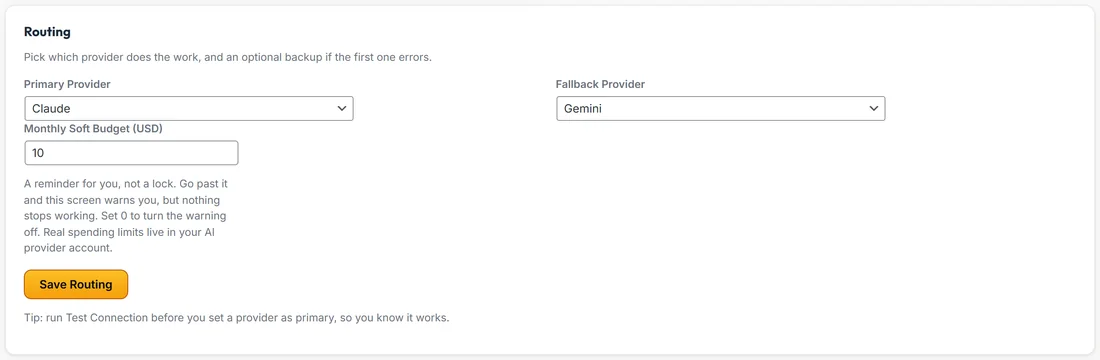
- On the Routing card, type a number into Monthly Soft Budget (USD).
- Press Save Routing.
- The AI Usage card now shows a bar and This month: what you have spent of your budget, as a percentage.
Go past it and the card shows You are past your monthly budget, with what you spent. Nothing has been blocked and everything still works. It is only a heads up. Set it to 0 to turn the warning off.
Real spending limits belong in your AI provider's account, where they can actually be enforced. A budget inside a plugin can only ever be a reminder.
What a funnel costs:
The plugin's own estimate is roughly 1 to 3 cents per page on a recommended model, paid to your provider, or nothing at all on the Gemini free tier. Rewriting a page or a section costs about the same as building it.
What costs nothing:
- Restyling a funnel with a different theme. No AI call is made
- Editing in Edit Content or Edit HTML
- Publishing and exporting
- Building the lead magnet PDF once the report is written
- Voice dictation. Your browser does the listening, so it never touches your key, your usage or your budget
A real example:
Calm Kitchen has made 17 AI calls, 13 of them in the last 30 days, for about 40 cents. Sarah's 10 dollar soft budget bar sits at 1% this month. The one failed call was a Gemini build that ran into Google's quota, and the row shows Gemini's own words.
Tips:
- Glance at Errors, 30 Days now and then. A number above zero is worth a click.
- Set a budget a little above your normal month. A warning then really means something unusual.
- Set a hard limit in your provider's account as well.