Each survey can send every finished response to an address you choose, as JSON, the moment it arrives. That is all Zapier, Make, n8n, a Google Sheets script or your own endpoint needs. There is nothing to install and no account to connect.
Where to find it:
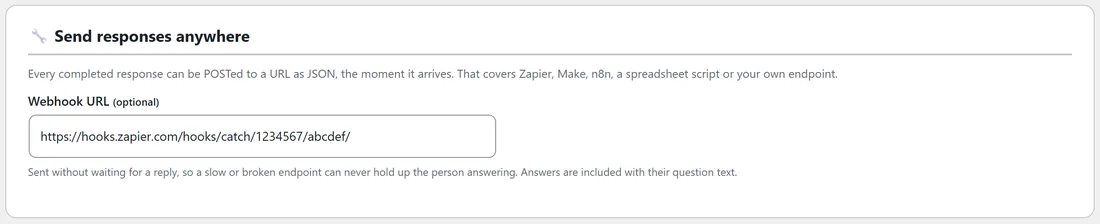
In the builder, open the last step, Publish & Share. The card Send responses anywhere has one field, Webhook URL. Integrations & AI has a reminder card too, Send responses anywhere else.
Step by step:
- In your automation tool, create a webhook trigger (in Zapier, "Catch Hook"; in Make, a custom webhook) and copy its address.
- Open the survey in the builder and go to Publish & Share.
- Paste the address into Webhook URL.
- Click Save survey.
- Answer the survey once yourself on its page, then check your tool received it.
Only an address that starts with http:// or https:// is accepted. Anything else is removed when you save, rather than stored and quietly never called.
When it is sent:
- For every finished response, with or without an email address.
- Not for unfinished responses from Save every answer as it is given; those wait for the final button like everything else.
- Without waiting for a reply. A slow or broken endpoint can never hold up the person answering, and they never see an error from it. Their answers are already stored on your site before the webhook is even tried.
What arrives:
{ "event": "survey.response", "site": "https://yoursite.com", "survey_id": 1, "survey": "Customer feedback, autumn 2026", "response_id": 412, "email": "nora.quinn@example.com", "name": "Nora", "answers": [ { "id": "q1", "question": "How likely are you to recommend Yoursite Academy to a friend?", "answer": "9" }, { "id": "q4", "question": "What would help you most next?", "answer": "More live Q&A calls, Done-for-you templates" } ], "at": "2026-11-02 14:02:11" }
The fields:
- event is always survey.response.
- site is your site's address, survey_id and survey the survey's number and title.
- response_id matches the response on the Responses tab.
- email and name are empty strings when the visitor did not leave them, never missing.
- answers lists each answered question with its id, its wording and the answer. Several checkbox answers arrive as one comma separated string, and scores and ratings as text.
- at is the time on your site's clock.
Because answers carry their question text, whatever receives them never has to know your question ids.
A real example:
Yoursite Academy wants every feedback response in a Google Sheet for the team. The owner creates a Zapier zap with Catch Hook, pastes its address into Webhook URL on the feedback survey, and answers the survey once. Zapier shows the sample with all six answers, and she maps each question to a column. Every new response now adds a row.
Prefer code?

Every response also fires the rsv_response_recorded action, and every opt-in fires rsv_lead_captured, inside WordPress. See Developer Hooks, Data Model And Troubleshooting.
Tips:
- One webhook per survey. To send several surveys to the same place, paste the same address into each.
- For email services, the built in autoresponder connection is simpler than a webhook. See Sending Survey Opt-Ins To AWeber, Mailchimp, ActiveCampaign And More, With Tags.