The AI Help button puts a helper on your website. A visitor or member asks a question and it answers from your own site, pointing to the page or training with its link. It starts closed, so nobody sees the panel until they open it.
Where to find it:
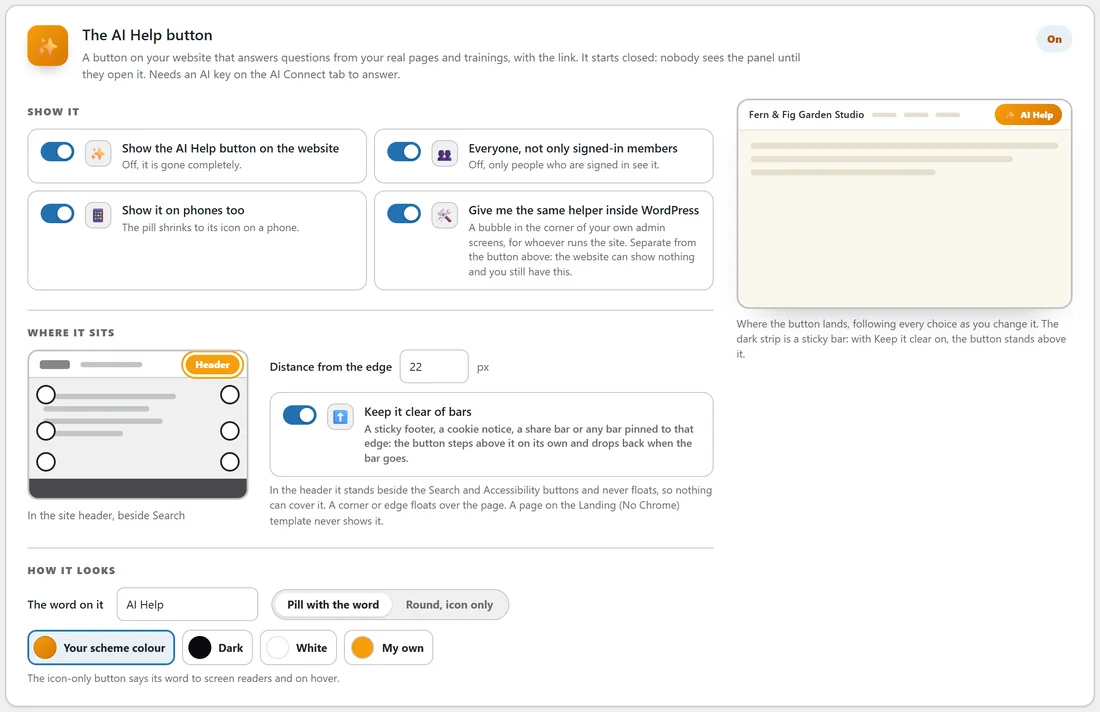
ResultsAiX Theme, Your Site, The AI Help button. It needs an AI key on the AI Connect tab to answer. Until a key is added, it stays out of sight on your website.
Show it:
- Show the AI Help button on the website: the master switch. Off, it is gone completely.
- Everyone, not only signed-in members: off means only people who are signed in see it.
- Show it on phones too: the pill shrinks to its icon on a phone.
- Give me the same helper inside WordPress: a bubble in the corner of your own admin screens, for whoever runs the site. It is separate from the button on the website.
Where it sits:

- Header: it stands beside the Search and Accessibility buttons and never floats.
- Or a corner or edge: bottom right, bottom left, right edge, left edge, or top right or top left under the header.
- Distance from the edge, in pixels.
- Keep it clear of bars: above a sticky footer, a cookie notice or a share bar, dropping back when the bar goes.
A page on the Landing (No Chrome) template never shows it.
How it looks:
- The word on it, such as AI Help.
- Pill with the word, or Round, icon only. The icon-only button still says its word to screen readers and on hover.
- Colour: Your scheme colour, Dark, White or My own.
The preview on the card follows every choice. Press Save Your Site.
What it answers from:
The assistant is given your site name, your trainings in course order with their summaries, your five newest posts and your pages, and is told to use only that, to include the link when it points somewhere, and never to make up pages, trainings, prices or addresses. When it cannot answer, it says so and points to your support link from the Customizer, or to the contact email on the Legal tab.
Limits that keep it calm:
- Each visitor can ask 20 questions an hour. Signed-in members are counted by their account.
- A question can be up to 1,000 characters.
- If your Primary provider errors, the Backup provider on AI Connect is tried.
- If a provider retires a model name, the theme reads the replacement from the provider's own reply and switches to it.
- The Monthly soft budget on AI Connect warns you when the 30 day estimate passes it. Every answer is listed on the usage panel.
Talk instead of type:
Turn on Talk instead of type on Your Site and a Talk button appears on the AI Help box and the search box. See Your Site Tab: Sticky Bar, YouTube Feed, Talk And Fonts.
A real example:
Jo turns on the AI Help button for everyone on yoursite.com, in the Header, as a pill in the scheme colour. A visitor asks which lesson covers containers. The assistant answers that Choosing Containers That Work covers it and gives the lesson's link. Asked about delivery times for seeds, it says it cannot answer that from the site and points to the Contact page.
Tips:
- Write a short excerpt on each training. The assistant reads it.
- Members-only sites: leave Everyone off so the helper is part of the members area.
- Set the Support link address in the Customizer so the assistant has somewhere to send people.